

AhmedKhamis
New Member
February 10, 2026
Solved

issue with symbols

  • February 10, 2026
  • 4 replies
  • 236 views

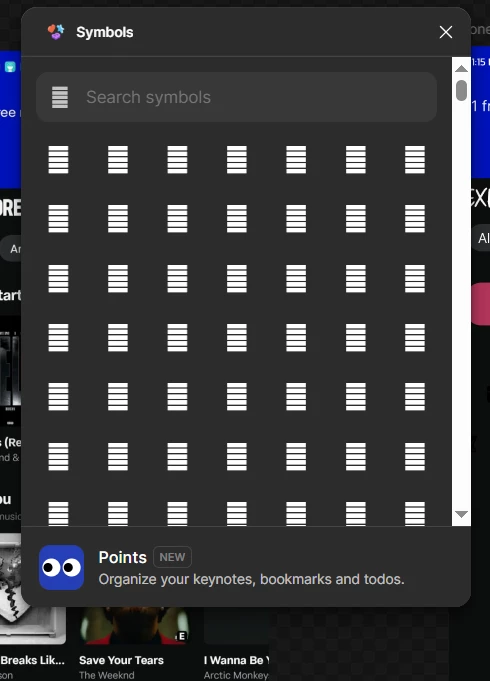
I have a problem when I try to use symbols — they appear in a distorted/broken form. I deleted the application and reinstalled it, but the same problem still exists. I also opened the website online and found the same issue there.

 

    This topic has been closed for replies.
    Best answer by djv

    Hi ​@AhmedKhamis, thanks for reaching out! 

    It looks like you’re referring to the Symbols plugin. Is that correct? 

    If so, plugins are managed by their creator. You can usually find the support contact listed on their Community resource page.
    For easy reference, please reach out to Symbols support via email at hi@linci.co for help.

    4 replies

    AhmedKhamis
    New Member
    February 10, 2026

    Has anyone experienced this issue?

    djv
    Figmate
    djvAnswer
    Community Support
    February 10, 2026

    Hi ​@AhmedKhamis, thanks for reaching out! 

    It looks like you’re referring to the Symbols plugin. Is that correct? 

    If so, plugins are managed by their creator. You can usually find the support contact listed on their Community resource page.
    For easy reference, please reach out to Symbols support via email at hi@linci.co for help.

    AhmedKhamis
    New Member
    February 10, 2026

    @djv Hi 
    Thank you so much for your quick response and guidance! I really appreciate your help.
    I’ll reach out to Symbols support as you suggested.

    GrevaGen
    New Participant
    February 14, 2026

    That distortion usually happens when there's a conflict with local fonts or a rendering glitch. If you’re using SF Symbols, try checking if you have multiple versions of the font installed on your system - that's a common culprit. Also, sometimes toggling 'Hardware Acceleration' in your browser settings (if you're on the web version) can fix the rendering issue instantly.