

Answer

Issue with scaling a nested icon with variable as dimension

  • November 6, 2025
  • 1 reply
  • 31 views

jackowy

I have sort of a quirky issue with icons:

  • I have a set of icons that are linked to my UI kit
  • icons are placed in, e.g. icon button and applied variable for it’s height (it’s locked aspect ratio but we found out applying the variable to height is more reliable than width)
  • we have 3 density modes: regular, compact, and ultra compact
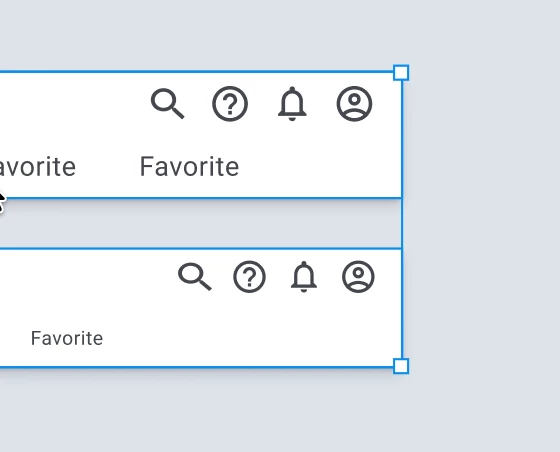
  • icon button nested in another component is causing the icon within to loose the 1:1 ratio when compact or ultra compact mode applied

The issue disappears when component gets detached 😓 (The search icon in the screenshot below is nested even deeper what only proves the issue is with this components being nested.)
 

Best answer by jackowy

The issue has been resolved thanks to Figma Support. Here’s the fix:

  1. Disable Lock aspect ratio
  2. Apply the desired icon variable to both the W and H dimensions
  3. Add instances of this new icon button to components (I actually had to redo all of the nested icon buttons by resetting overrides and applying them again).

1 reply

jackowy
  • Author
  • New Member
  • Answer
  • November 13, 2025

The issue has been resolved thanks to Figma Support. Here’s the fix:

  1. Disable Lock aspect ratio
  2. Apply the desired icon variable to both the W and H dimensions
  3. Add instances of this new icon button to components (I actually had to redo all of the nested icon buttons by resetting overrides and applying them again).