

iPhone Duo "Open" preset is 890×626, but Apple's kit and App Store Connect point to 951×669
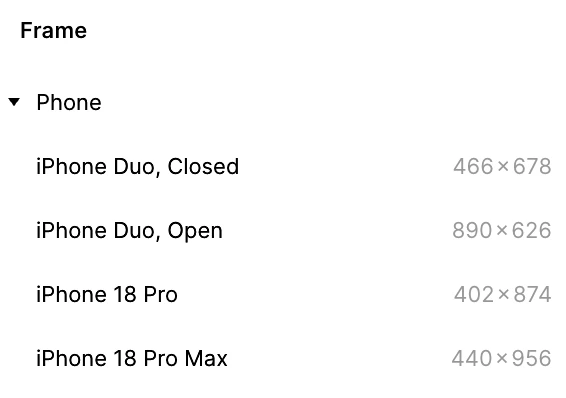
I noticed the new "iPhone Duo, Open" frame preset is 890×626, while Apple's official iOS 27 Figma UI Kit uses 951×669 (669×951 portrait). I dug into where the gap comes from.
- 890×626 matches the inner panel's physical resolution (1878×2670 px, from Apple's tech specs) divided by 3.
- App Store Connect, however, requires inner-display screenshots at 2853×2007 px, which works out to 951×669 pt @3x.
So it looks like iOS renders the inner display at 951×669 pt @3x and then scales it down to the panel, much like iPhone 8 Plus did. If that's right, designing on the 890×626 preset gives you a canvas about 6.9% smaller than what apps actually render at.
The "Closed" preset (466×678) lines up fine, because the outer display's screenshot size matches its panel (1398×2034).
For now I'm setting inner-display frames to 951×669 by hand. Has anyone checked this in the simulator or on a device? Would love to hear if you've seen something different.
Sources:
- https://www.apple.com/iphone-duo/specs/
- https://developer.apple.com/help/app-store-connect/reference/app-information/screenshot-specifications