

Answer

Inter' Thai 600 weight glitch (possible fallback issue?)

  • August 28, 2025
  • 5 replies
  • 90 views

Mai P.

tl:dr: Thai text in Inter at 600 weight look glitched but only for me + one peer in the org. Others don’t face it → might be a fallback/rendering issue in Figma?


My team and I have been using Inter for both Thai and English, set it up in our design token for dev. Just found out that Thai text at 600 weight gets glitchy even we both have tried to double-clicks the layers so many times for the design to recover. English looks fine till now, only Thai breaks and remains invisible (see attachment below and recording link here).


What my peer and I tried so far:

  • Cleared cache
  • Reinstalled Figma desktop app (version 125.7.5)
  • Even update iOS to Sequoia 15.6.1
  • Tested on personal devices with the same accounts

= Still the same


Question:

  • Any way to fix this without replacing it with the new typeface?


Appreciate any pointers 🙏
Best answer by Mai P.

Update: The issue seems to be fixed now 🙌👏

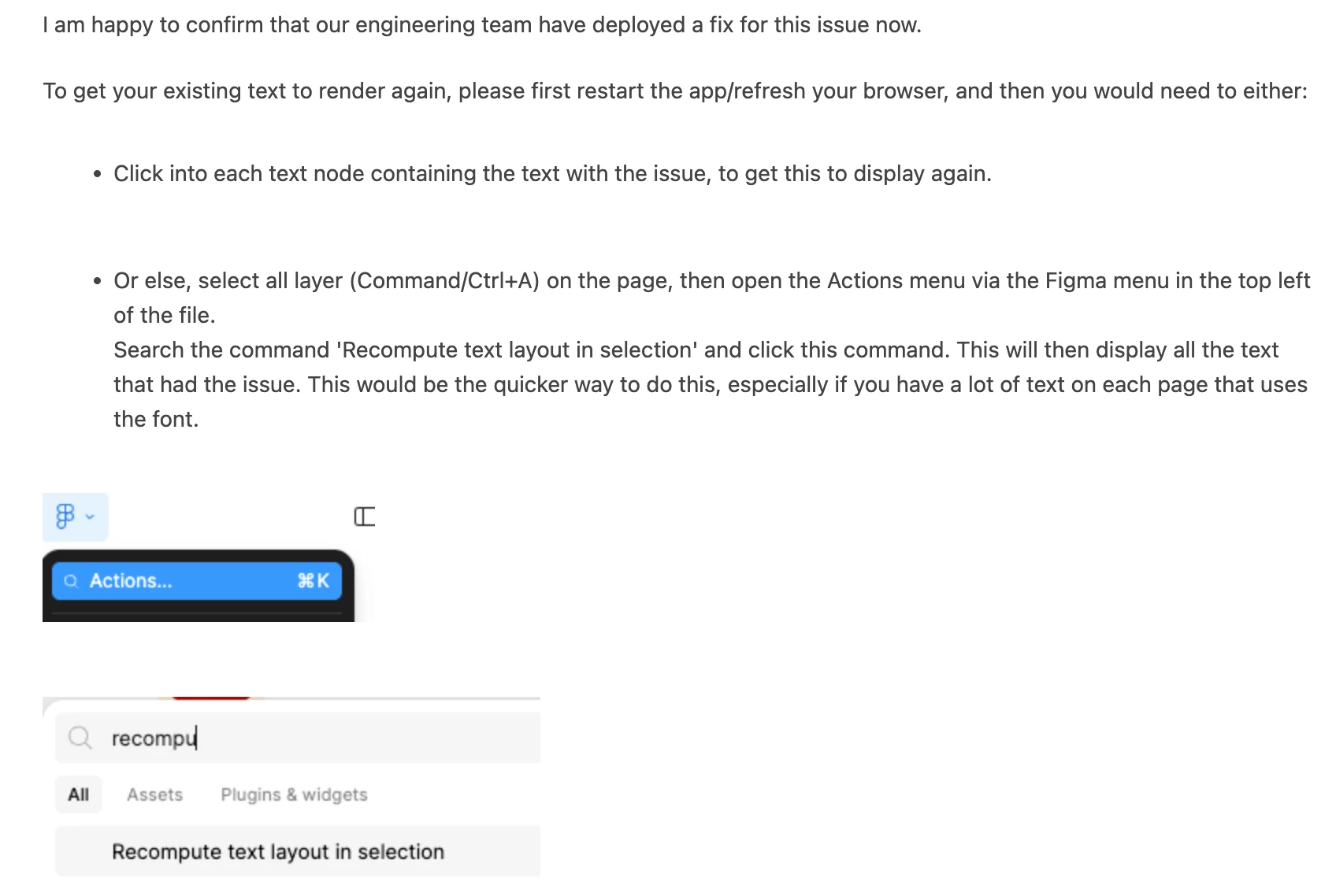
Earlier, my team and I tried the same steps (see the attached image) but they didn’t work. After retrying with the solution Figma Support shared, everything works perfectly this time. Looks like Figma fully resolved the bug on their end.

Leaving this here in case it helps anyone else who runs into the same problem!


5 replies

Mai P.
  • Author
  • New Member
  • Answer
  • September 2, 2025

Update: The issue seems to be fixed now 🙌👏

Earlier, my team and I tried the same steps (see the attached image) but they didn’t work. After retrying with the solution Figma Support shared, everything works perfectly this time. Looks like Figma fully resolved the bug on their end.

Leaving this here in case it helps anyone else who runs into the same problem!


khompitoon
  • New Member
  • September 2, 2025

tl:dr: Thai text in Inter at 600 weight look glitched but only for me + one peer in the org. Others don’t face it → might be a fallback/rendering issue in Figma?


My team and I have been using Inter for both Thai and English, set it up in our design token for dev. Just found out that Thai text at 600 weight gets glitchy even we both have tried to double-clicks the layers so many times for the design to recover. English looks fine till now, only Thai breaks and remains invisible (see attachment below and recording link here).


What my peer and I tried so far:

  • Cleared cache
  • Reinstalled Figma desktop app (version 125.7.5)
  • Even update iOS to Sequoia 15.6.1
  • Tested on personal devices with the same accounts

= Still the same


Question:

  • Any way to fix this without replacing it with the new typeface?


Appreciate any pointers 🙏


khompitoon
  • New Member
  • September 2, 2025

tl:dr: Thai text in Inter at 600 weight look glitched but only for me + one peer in the org. Others don’t face it → might be a fallback/rendering issue in Figma?


My team and I have been using Inter for both Thai and English, set it up in our design token for dev. Just found out that Thai text at 600 weight gets glitchy even we both have tried to double-clicks the layers so many times for the design to recover. English looks fine till now, only Thai breaks and remains invisible (see attachment below and recording link here).


What my peer and I tried so far:

  • Cleared cache
  • Reinstalled Figma desktop app (version 125.7.5)
  • Even update iOS to Sequoia 15.6.1
  • Tested on personal devices with the same accounts

= Still the same


Question:

  • Any way to fix this without replacing it with the new typeface?


Appreciate any pointers 🙏

Ch khompitoon


khompitoon
  • New Member
  • September 2, 2025

tl:dr: Thai text in Inter at 600 weight look glitched but only for me + one peer in the org. Others don’t face it → might be a fallback/rendering issue in Figma?


My team and I have been using Inter for both Thai and English, set it up in our design token for dev. Just found out that Thai text at 600 weight gets glitchy even we both have tried to double-clicks the layers so many times for the design to recover. English looks fine till now, only Thai breaks and remains invisible (see attachment below and recording link here).


What my peer and I tried so far:

  • Cleared cache
  • Reinstalled Figma desktop app (version 125.7.5)
  • Even update iOS to Sequoia 15.6.1
  • Tested on personal devices with the same accounts

= Still the same


Question:

  • Any way to fix this without replacing it with the new typeface?


Appreciate any pointers 🙏

Ch khompitoon


khompitoon
  • New Member
  • September 2, 2025

tl:dr: Thai text in Inter at 600 weight look glitched but only for me + one peer in the org. Others don’t face it → might be a fallback/rendering issue in Figma?


My team and I have been using Inter for both Thai and English, set it up in our design token for dev. Just found out that Thai text at 600 weight gets glitchy even we both have tried to double-clicks the layers so many times for the design to recover. English looks fine till now, only Thai breaks and remains invisible (see attachment below and recording link here).


What my peer and I tried so far:

  • Cleared cache
  • Reinstalled Figma desktop app (version 125.7.5)
  • Even update iOS to Sequoia 15.6.1
  • Tested on personal devices with the same accounts

= Still the same


Question:

  • Any way to fix this without replacing it with the new typeface?


Appreciate any pointers 🙏