Solved

Incorrect keyboard shortcut on Windows to select parent layer

  • July 13, 2026
  • 2 replies
  • 21 views

Boris de Melo
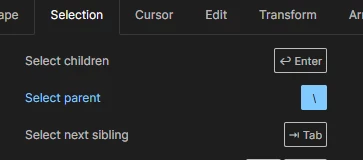
Screenshot of shortcuts panel showing the ‘Select parent’ keyboard shortcut
​

On Windows, the shortcut to select parent is Shift-Enter, but the shortcuts panel shows the Mac shortcut. I’ve recently moved from Mac to Windows, so this was very frustrating to figure out as it’s a commonly used shortcut.

Best answer by Celine_

Hi there, Celine from the Figma Community Support team here! Thanks for taking the time to report this and for sharing your experience.

I checked with the team, and they confirmed that both shortcuts are supported on both macOS and Windows. I can definitely understand how seeing only the Mac shortcut displayed in the shortcuts panel could be confusing after switching to Windows.

One additional thing to note is that the \ shortcut depends on the keyboard layout selected in Figma's application settings (rather than your operating system's keyboard layout), which may also have contributed to what you were seeing.

Thanks again for flagging this! I've shared your feedback with the team regarding the shortcuts panel, as it's helpful to know where the current experience can be confusing.


2 replies

Celine_
Figmate
  • Community Support
  • Answer
  • July 13, 2026

Hi there, Celine from the Figma Community Support team here! Thanks for taking the time to report this and for sharing your experience.

I checked with the team, and they confirmed that both shortcuts are supported on both macOS and Windows. I can definitely understand how seeing only the Mac shortcut displayed in the shortcuts panel could be confusing after switching to Windows.

One additional thing to note is that the \ shortcut depends on the keyboard layout selected in Figma's application settings (rather than your operating system's keyboard layout), which may also have contributed to what you were seeing.

Thanks again for flagging this! I've shared your feedback with the team regarding the shortcuts panel, as it's helpful to know where the current experience can be confusing.


Boris de Melo
  • Author
  • New Member
  • July 13, 2026

Hi Celine, thanks for your response. 

Yes, I’m in the UK, so that was indeed the issue. The keyboard in Figma was set to Mac UK. Now that I’ve changed it to UK PC, it has updated to show the # key as the shortcut, and this actually works while the \ key did not.

Thanks for your help.

screenshot showing the # key as the shortcut for ‘Select parent’

Â
