

Question

Image editing (AI) Use AI to remove backgrounds, expand images, isolate objects, and more. Not working

  • June 7, 2026
  • 3 replies
  • 22 views

YOureka Artist

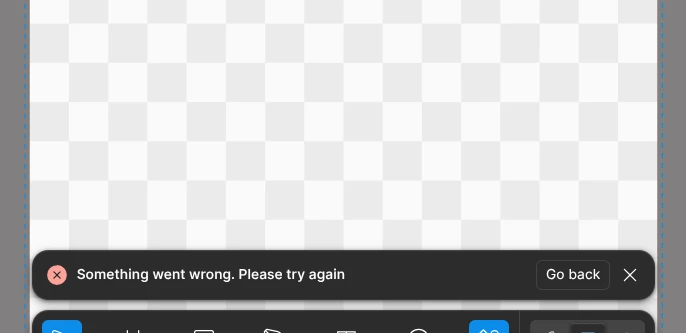
FOR OVER TWO MONTHS I HAVE NOT BEEN ABLE TO EDIT/GENERATE IMAGES IN MY DESIGN FILES WHENEVER I TRY I GET THE SOMETHING WRONG ERROR AND FOR THE LONGEST I HAVE NOT BEEN ABLE TO USE FIGMA MAKE (I HONESTLY LOST HOPE) AND I AM USING THE PAID PLAN, REALLY FRSUTRATING!!

PLEASE HELP
 

3 replies

Tom Reem
Figmate
  • Figmate
  • June 7, 2026

👋🏻 Hi ​@YOureka Artist, welcome to Figma Forum and thanks for flagging this. Really sorry this has been dragging on — that should not be happening.

Before diving in: It looks like our Technical Quality team has already reached out with next steps on sharing your file securely. Please check the inbox associated with your Forum account for their message — your case number is: 1903055. That file access will help them pinpoint what's going on.

In the meantime, a few questions that'll help us dig deeper:

  1. Steps leading up to the error. What are you doing right before the "Something went wrong" message appears?
  2. Affected AI features. Is this isolated to image editing (remove background, expand image, etc.), Figma Make, or both?
  3. Selected AI model. What model (default, etc.) are you using in Figma Make, and does selecting a different one remove or reduce the occurrence of this error message?
  4. Consistency. Does the error appear every time, or intermittently? Has anything changed in your setup (browser, network, plan) around when it started?

For additional context on known "Something went wrong" errors in Figma Make, this troubleshooting article may be useful: Troubleshoot in Figma Make → Error messages.

We’ll keep an eye out for your reply.


YOureka Artist
  1.   Simply entering a prompt in the input field gives that error
    2.  Both
    3.  All
    4.  Everytime

Tom Reem
Figmate
  • Figmate
  • June 8, 2026

Hey ​@YOureka Artist, thanks for confirming. This definitely should not be happening.

The next step in getting to the bottom of this is a closer look at the file where it's occurring — please check your email inbox for a message from our Technical Quality team. Your case ID is: 1903055, if it helps you locate it.

If you run into any trouble reaching them, please let me know. 🙏🏻