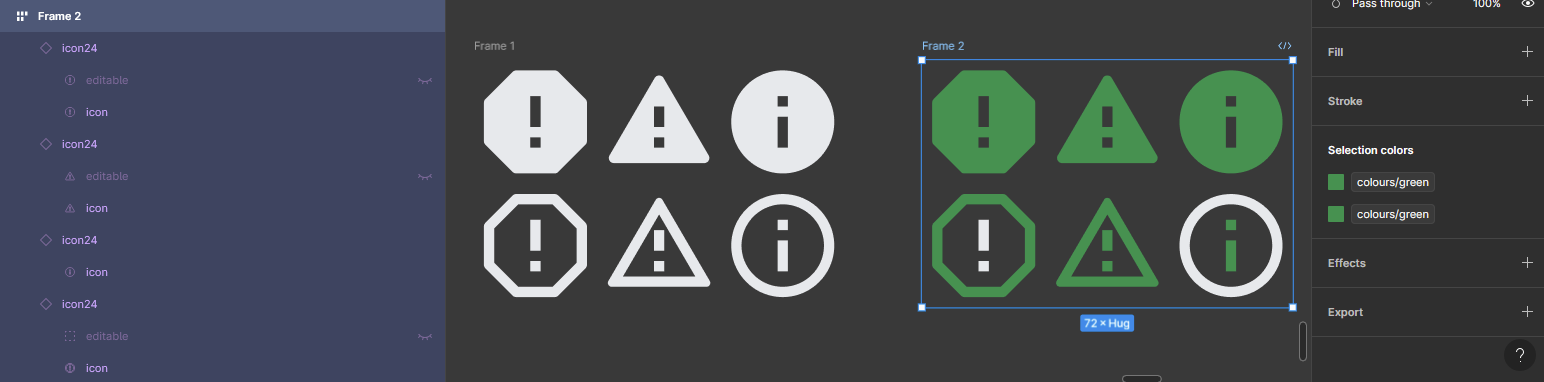
Icons/vectors not changing colour properly
When I try to change the colour of the icon, sometimes it will only change some parts of the icon.
The icons consist of a single vector shape and the variants have standardised layer naming and default colour white. Changing colour, the “selection colors” section in the right-hand side tool bar shows the change although nothing has visually changed.
I maintain a component library and use its components on other file. My icon24 component has currently 146 variants and I have issue currently with 7 of them. Changing the colour of the icons in the component library does what you would expect and does not reproduce a similar issue. The issue is present only on other files that use this component and it is the same icon variants that behave inappropriately.
Recreating a variant removes the issue but it might appear randomly on any of the other variants.
Please help 🥲