Question

icon stroke size bug

  • June 11, 2026
  • 7 replies
  • 52 views

mohamad hosein

I’m experiencing a bug with stroke widths on some icons in my file.

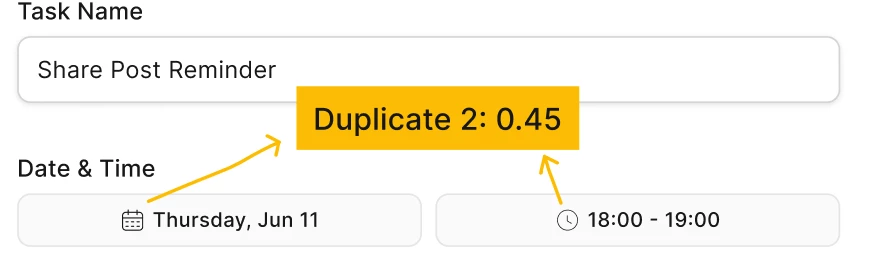
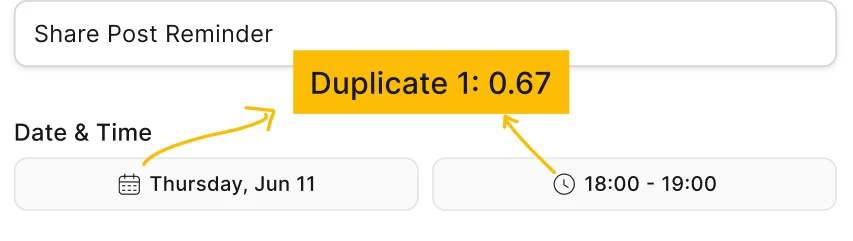
When I duplicate certain icons, their stroke width becomes smaller each time. For example, after duplicating an icon multiple times, the stroke visually keeps getting thinner and thinner.

I can manually correct the stroke width value, but after reloading the file, the stroke width goes back to the previous incorrect value.

The stroke width gets smaller with each duplication, and manual corrections do not persist after a file reload.

This seems to happen only with some icons, not all of them.
 

7 replies

djv
Figmate
  • Community Support
  • June 11, 2026

Hi ​@mohamad hosein, thanks for reaching out! 

This definitely seems odd. Since you mentioned that this bug isn’t consistent, may I ask if you’re experiencing this bug when duplicating components or instances where the stroke weight is linked to a Variable?

If so, some variables will automatically reset, override, or change when an instance is moved or placed into a different container. If this is the case, try unlinking the variable by clicking on the variable icon (the little pill/diamond) in the Stroke input field and type a manual pixel value. 

If this isn’t the case, please let me know, and we’ll continue to troubleshoot. 


mohamad hosein

Hi ​@mohamad hosein, thanks for reaching out! 

This definitely seems odd. Since you mentioned that this bug isn’t consistent, may I ask if you’re experiencing this bug when duplicating components or instances where the stroke weight is linked to a Variable?

If so, some variables will automatically reset, override, or change when an instance is moved or placed into a different container. If this is the case, try unlinking the variable by clicking on the variable icon (the little pill/diamond) in the Stroke input field and type a manual pixel value. 

If this isn’t the case, please let me know, and we’ll continue to troubleshoot. 


Hey ​@djv 
No, the stroke weight is not linked to a Variable.

The icon is currently only inside the button component, but it’s not nested, and its stroke weight hasn’t been variable-bound to any specific value. It’s just using a regular stroke value, not a linked Variable.

I was also manually setting the stroke weight myself whenever I needed to adjust it.


djv
Figmate
  • Community Support
  • June 17, 2026

Hi ​@mohamad hosein, thanks for the additional context! 

That's definitely helpful to know. Since the stroke isn't variable-bound, this sounds like it could be a component override issue rather than a variable one. A couple of things worth trying:
1. Check if the icon has a stroke override set at the component level. Open the main component and inspect the stroke. If it has a value defined there, duplicating instances may be inheriting and compounding that value unexpectedly.
2. Try detaching the icon from the component (right-click → Detach instance) on one copy to see if the stroke still changes after reload. This helps narrow down whether the issue lives in the component relationship or the file itself.
3. Can you share a short screen recording or a copy of the file (with just the affected icon + button component) with Can View access?

This should help us reproduce it and get a clearer picture of what's happening. With this information, I can also help connect you with our technical quality team to investigate further. 


mohamad hosein

@djv Hi again, thanks for the guidance!
 

I created a separate file and copied the affected modals along with the button component into it so your team can take a look and investigate.

A couple of notes:

  • When the component is detached, or when it’s fully reset, the issue seems to be resolved.
  • However, I checked again inside the component and I don’t have any stroke override set there.

Please let me know if you need anything else from my side.
 

https://www.figma.com/design/bwr79iWd1QIX3EK1qthlzg/icon-stroke-size-bug?node-id=0-1&t=X4bgB8zKyS0wXeIb-1


adamsmasher
Figmate
  • Figmate
  • June 21, 2026

Hi, ​@mohamad hosein! Thanks for the additional information.


I’ve just created a ticket with our Technical Quality team like ​@djv suggested, and you should get an email for that shortly. Feel free to reply to that email with additional information - I included a summary and a link to the file you shared. Thanks so much for your patience!


Mizael Ribeiro

We've been experiencing something similar around here. We use the "myicons" library with our design system.

So, we have two published libraries: one for our components and another for the icons. Naturally, the icons are 24px with a 1.5px stroke, but for some components, we downscale them to 16px with a 1px stroke.

In this case, when the icon is downscaled to 16px, Figma hardcodes the stroke width, resulting in the 0.67px issue that@mohamad hosein is experiencing.

I did some deep research into why this might be happening. In my opinion, it's due to the scaling. Since our main icon is 24px, when we scale it down to 16px, the ratio is 0.667 (a 33% reduction), and if you round this number, you get 0.67.

Another thing we noticed—which actually solved the issue in some cases—is how the layers of the main icon are built: [home icon component frame] → group → path. We ungrouped them so they are just: frame → path.

Doing this made the resizing work in most cases. However, now we have the tedious task of resetting all the instances and re-selecting the icons because Figma lost the links to the stroke.


Jaycee Lewis
Figmate

Hi ​@mohamad hosein 👋 Adam sent you a few additional questions in the support ticket. Its ID is 1973555 and the subject line is “When I copy an icon the stroke value on the copy changes. If I alter the value, it resets back to incorrect value when reloading/refreshing.” 

Hey hey ​@Mizael Ribeiro 👋 Thanks for being a rockstar and adding those details 🤩 

Would you be willing to work with me and open a separate bug report for this? I can do the ticket, but I need the following (in the support ticket is fine):

  • a not-zoomed-in screen-recording of the issue in action
  • link to the file, or copy of the file, where the issue occurs
  • the above example + any additional screenshots

If so, just reply and tag me and I’ll get it started. Thank you very much! — Jaycee