Icon size glitch [new]

  • December 2, 2025
  • 8 replies
  • 147 views

Ionut Oroian

Hi all.

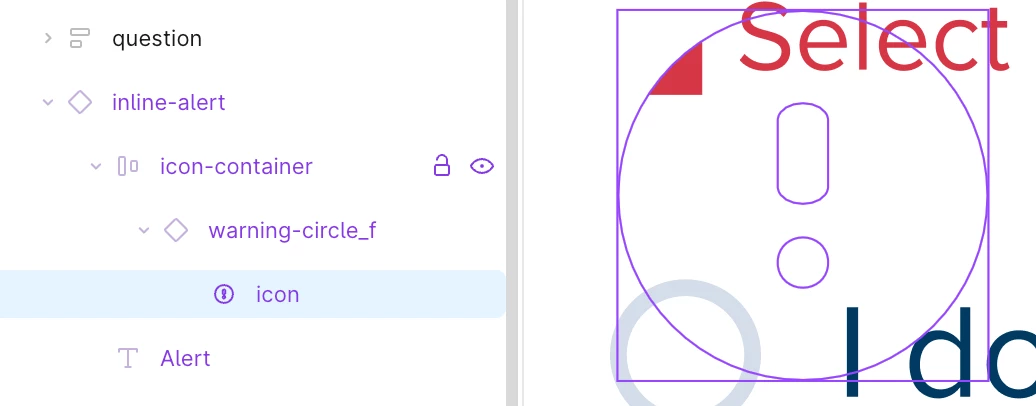
I started see size issues with the vector within my icon components. 
In short, the vector/shape within the icon doesn’t resize according the icon size.


The vector shape is already using scale, so it’s nothing easy. This issue started showing up in the last couple days. Sometimes the issue is fixed by double-clicking on the component (but this only work for the icon component, anything that’s nested doesn’t work).


This looks new, never had this issue before.


8 replies

Alexandre_Gallois

I have exactly the same issue. Had to stop working because everytime I opened a file my icons would mess up and there was no way back


Ionut Oroian
  • Author
  • New Member
  • December 2, 2025

I have exactly the same issue. Had to stop working because everytime I opened a file my icons would mess up and there was no way back


Switching between component variants worked for me. Give it a try. 

The glitch is super random, icons work on some screens but act up on newer ones. 


Michelle Park

I’m experiencing the same issue on my side as well.

All of our icon components are correctly set up (fixed size, no stretch, no auto-scaling, no local overrides), and the components themselves haven’t changed — but the instances inside Auto Layout suddenly appear much larger than their original size.


In my case:


  • The icons look stretched or oversized when the file first loads

  • Constraints and component structure are all correct

  • No overrides were applied

  • As soon as I double-click the instance, the size snaps back to the correct 24×24 (or original) value

  • It feels like the layout engine is miscalculating instance size on load

  • Happens across multiple files and multiple team members


We also checked:


  • Rebuilding the icon components → issue still occurs

  • Wrapping icons in a fixed-size frame → reduces the frequency but does not fully resolve it

  • No custom overrides or broken variants


So it really seems like a recent Auto Layout / constraint engine regression rather than a component setup mistake.


lucieng.l
  • New Member
  • December 3, 2025

I’m having the same issue. Every time I duplicate a frame that contains an icon instance (one or several), the icon shapes stretch automatically and spill out of their box or frame in the bottom-right corner. Sometimes I can command-click the vector shape and it snaps back to its normal size, but most of the time I have to detach the instance to fix it. When I detach it, the vector resizes and positions itself correctly on its own.


My colleague works on the same files with the same library and doesn’t have the issue. On my side I tried resetting Figma, uninstalling it, using it in the browser, switching accounts (even tried my colleague’s account that doesn’t have the glitch) and nothing worked. The glitch keeps happening every single time.


I did notice a few icons glitch earlier in November but nothing this bad. Now it happens every time I duplicate an icon so I basically can’t work in Figma unless I’m fine with slowly breaking our company files by detaching every icon.


Chris_Rupp
  • New Member
  • December 3, 2025

We’re experiencing the same issue with icons in our design system over the last couple of days. It’s most noticeable with icons that have boolean operations and have duplicated.

For now, selecting the icon (or parent container) and pressing enter a few times seems to re-render/calculate the icons correctly. 


Ben_Simpson
  • New Member
  • December 3, 2025

My team is experiencing the same issues. Vectors, specifically icons, are oversized and mis-aligned. Sometimes it can be fixed simply by clicking into it. Other times we’ve had to do an instance swap to the same icon to fix it. Definitely something that’s going to cost companies a lot in QA reviews if it’s not hot fixed.


Tien
  • New Member
  • December 4, 2025

Same here. I found that the issue happens when these icons are nested under a bigger component. If I detach the component, the icon will no longer glitch


shatilovich.r

Same issue here. I have to switch the component style to fix bug