

Question

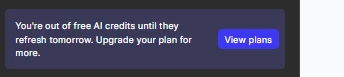
I have a paid plan but it is showing that I dont have enough AI credits to create AI content

  • November 20, 2025
  • 4 replies
  • 64 views

ameen

I have a company account where we have a paid professional plan, but when i tried creating a mock on AI backed feature, it is throwing a message that I am out of free AI credits. I don't know why it is still showing as free even after having a paid account 


4 replies

  • Figmate
  • November 21, 2025

Hi ​@ameen,


I understand that you’re seeing a message about running out of AI credits, even though you’re on a Professional plan.


I also noticed that you have access to both a Free Starter team and a Professional team.
Please note that Figma plans are tied to teams, not individual accounts. Could you double-check whether the file where you’re seeing this message belongs to your Professional team, and that you have a Full seat there?

Here are a few helpful references:


If you’re on a Full seat under a paid plan, and the file you’re working on is within that team, AI credit limits aren’t being strictly enforced at this time. Figma plans to introduce the ability to purchase additional AI credits for power users sometime in 2026. You can learn more here: How AI credits work


Once you’ve confirmed the above but the issue still persists, please share the file URL here so we can escalate this issue to our team if necessary.


Thanks,


ameen
  • Author
  • New Member
  • November 21, 2025

I still don’t see a professional team location.
I am sharing my profile url for your earliest action- https://www.figma.com/files/team/1473299391428344798/all-projects?fuid=1473299387565267816

Also below are the screenshots


  • Figmate
  • November 21, 2025

Thanks for sharing your screenshot.
 

It looks like your Free Starter team is selected in the screenshot.
Because the file is located within a Starter team project, the limit you mentioned is being applied.

You can switch teams using the dropdown icon next to your team name in the left sidebar.

This guide explains how: Guide to the file browser > Your side bar > Team 

After switching to your Professional team, try creating a new file there, or move your existing file from the Starter team to the Professional team to continue working.


Thanks,


ameen
  • Author
  • New Member
  • November 24, 2025

.