

iKristy
New Participant
September 16, 2026
Solved

I can no longer easily create sections when selecting multiple frames

I used to have an option whenever I selected multiple frames and layers to group them into a section, in the right hand sinde panel. It’s gone now since the latest update. Why???


Also, now for some reason, when I tried to get around this limitation and try to do it manually, sometimes when I ⌘+G them and go to the dropdown to select the group type, I have Section grayed out (not always, but in certain circumstances). Why???
iKristy
iKristySolution
New Participant
September 25, 2026

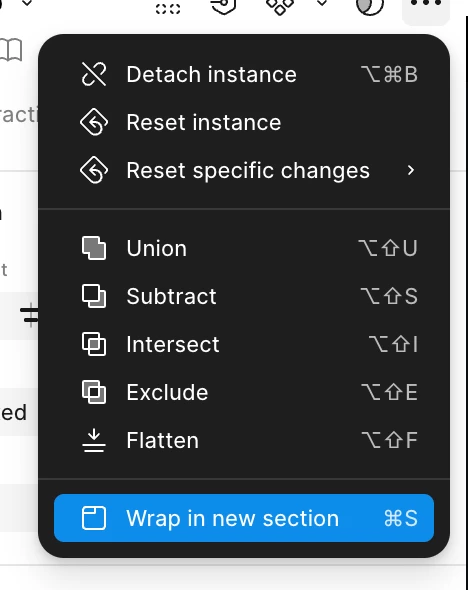
@djv Thank you!! The problem was I didn’t have the “Wrap” action in the overflow menu or in the top toolbar that I was really used to using before. But I just tried again and it seems it’s back now! (for now!) 🙌
 

Appreciate the follow up!

5 replies

djv
Figmate
Community Support
September 17, 2026

Hi ​@iKristy, thanks for reaching out! 

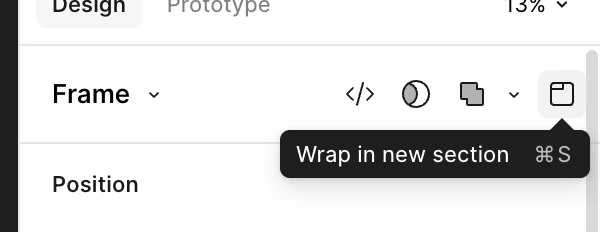
I understand how this must be slowing down your workflow, but I’m not able to reproduce this issue on my end. The icon to Wrap in a new section as well as the drop down menu to choose a group type, consistently shows Section. 


Are you able to share what you see on your end when you have two frames selected on the canvas? I’d love to investigate this further. 

iKristy
iKristyAuthor
New Participant
September 23, 2026

Hey, thanks for the reply!


I cannot replicate the behavior when the ‘Section’ item was disabled, but I want to call out I do not have that section icon as you do in the top toolbar:


Also, I would’ve sworn I had a little suggestion menu above the central toolbar to group items in a section, when I had a frame/group selected. I don’t see that anymore either. But not sure if I’m hallucinating that or… 😅

djv
Figmate
Community Support
September 23, 2026

Thanks for following up and providing screenshots, ​@iKristy! 

Somehow, the Section icon has disappeared for me too. 😅
I now see the Wrap in a new section option under an ellipses menu.


And for the bottom toolbar, the option to create a Section is in the same menu as Frame, but nothing here to Wrap in a new section. 


There’s also the right-click menu.