

Question

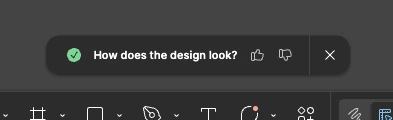
How does the design look? pop up
  • March 11, 2026
  • 7 replies
  • 32 views

Doug2


This popup does not go away. I have answered this question in every way possible and it keeps returning. Please turn it off. It is not clear what this is even referring to. My design? The Figma App design? Something else?

7 replies

djv
Figmate
  • Community Support
  • March 12, 2026

Hi ​@Doug2, thanks for flagging this!

What did you do exactly before this toast notification appeared? What OS are you using, and is this happening in the browser or desktop app? 

I just tried to recreate this issue in Figma Design after using various AI Tools, and I can easily close it by clicking X. Please provide more details, and we can continue troubleshooting together. 


Doug2
  • Author
  • New Participant
  • March 13, 2026

I don’t remember what I did prior to it popping up. I am on a macbook pro M1 and I use the figma desktop app. Mac OS Sequoia. I can easily close it too. But closing it does not keep it closed and the message keeps returning intermittently. Not every day but maybe once a week. Doesn’t matter what input is provided. And it is not clear what the question is referring to. Its annoying and irritating that it won’t go away once dismissed.


djv
Figmate
  • Community Support
  • March 13, 2026

Hi ​@Doug2, thanks for clarifying! 

It is currently expected for this toast notification to reappear when using AI tools. The goal of this notification and the question is just to get quick feedback on any design changes made using AI for our AI teams. If this is appearing when not using any AI tools, that would definitely be unexpected.

If you’re not using any AI tools when creating your designs, please let me know. In that case, please provide a URL link to your file, and we can flag this over to the team to investigate what is prompting the toast notifications. Hope this helps clarify, but please let me know if you have any further questions or concerns.


Doug2
  • Author
  • New Participant
  • March 17, 2026

I am not using any AI tools. I am in Figma Design, not Figma make. I can’t provide the URL due to client contracts.


djv
Figmate
  • Community Support
  • March 17, 2026

Hi ​@Doug2

There are AI tools within Figma Design. Have you used any of the following from the Actions menu? 


There are Image editing, Design tools, and Riffing and writing AI tools available within the Actions menu, so using any of these will usually prompt the How does the design look? toast notification. 


Doug2
  • Author
  • New Participant
  • March 18, 2026

This notification is appearing when none of Figma Designs AI tools have been used. It pops up randomly without context.


djv
Figmate
  • Community Support
  • March 20, 2026

Thanks for clarifying, ​@Doug2

I’ve created ticket #1806652 with our support team and provided everything we’ve discusses so far here. The team will review and be in touch to investigate further. 

If you have any further questions or concerns, please reach out to support directly via email.