
Kumar Niraj
New Member
Nov 1, 2026 9:40 AM UTC
Question

How do i remove this annoying overlay
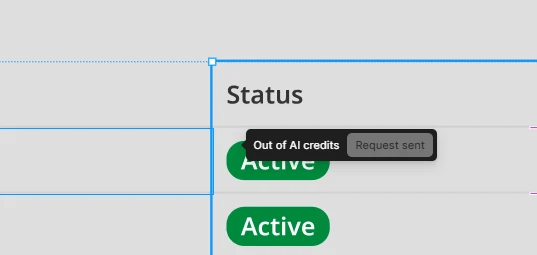
Persistent AI overlay

When i accidently press control enter this opens up and then no matter where I click, I am not able to remove this overlay for entire month, and this is so irritating 

1 reply

Tom Reem
Figmate
Figmate
Nov 1, 2026 8:32 PM UTC

Hey ​@Kumar Niraj, welcome to Figma Forum and thanks for getting that screenshot. Sorry for the disruption — the overlay shouldn’t persist over your canvas like this.

I have a few questions to help narrow this down:

  1. Does reopening or refreshing the file clear it?
  2. Is this happening in a browser, the Figma Desktop App, or both? Which browser or app version are you using?
  3. Does turning off on-canvas prompting clear the overlay? To turn off: In your Design file, open Main menu (aka the Figma logo) → Preferences → Show agents on canvas and uncheck it.
  4. With that setting off, does pressing Ctrl+Enter bring the overlay back?


Your answers will help me understand what’s happening and pass the details to the right team for a deeper look. 🙏🏻