
Jeti
New Member
September 29, 2026
Question

Hide the figma AI popover
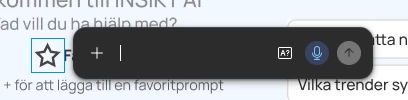
Sometimes when working in figma I accidentally click the AI-stars. How do I hide this popover without typing a prompt. It is in the way and I never seem to be able to get rid of it...

3 replies

Donkt
Figmate
Figmate
September 29, 2026

Hi ​@Jeti!

I’ve done exactly the same thing. To hide the Figma AI Agent sparkle icon that appears when you select elements on your canvas, you can navigate to the Main Menu > Preferences and toggle off Show Agents on canvas.

I hope this helps!

Jeti
JetiAuthor
New Member
September 30, 2026

Hello! Unfortunately this is not exactly what I meant. I like the stars and I like to have them avaliable for when I want to use them. However, sometimes I misclick and accidentaly click the stars which opens the dark-grey popover (which i attached as an image in my original post) which I cannot seem to close or get rid of without having to write a prompt. If i misclicked I would simply like to exit or hide this popover.

Thank you anyways, it’s great to know that I can hide them completely though that is not the solution for me at the moment.

Have a great day!

Donkt
Figmate
Figmate
October 6, 2026

Hi ​@Jeti 

Thanks for clarifying the issue for me, and sorry I didn’t catch what you meant in your first post.

I’ve just had a quick test in one of my own files and it looks like I can close those just by hitting the Escape key or clicking elsewhere on the canvas/on another layer. If that’s not working for you, could you please:

  • Confirm if you’re using the most recent version of Figma
  • Let me know if you’re using the desktop or browser version
  • Tell me which operating system you’re using
     

If you’re not using the most recent version of Figma, try updating and both hitting Escape and clicking around. If that still doesn’t work, come back to me here and I’ll ask the team to look into this for you further. Alternatively, you can flag this yourself directly here by searching ‘bug’ then scrolling down and clicking Start a chat.

I hope this helps!