

Question

Help removing extra seats from my Figma organization plan

  • June 29, 2026
  • 1 reply
  • 27 views

Alex SXR

Hello dear Figma Team,

I purchased a Figma Organization plan with two seats: 1 Dev seat and 1 Full seat, for a total of $960.

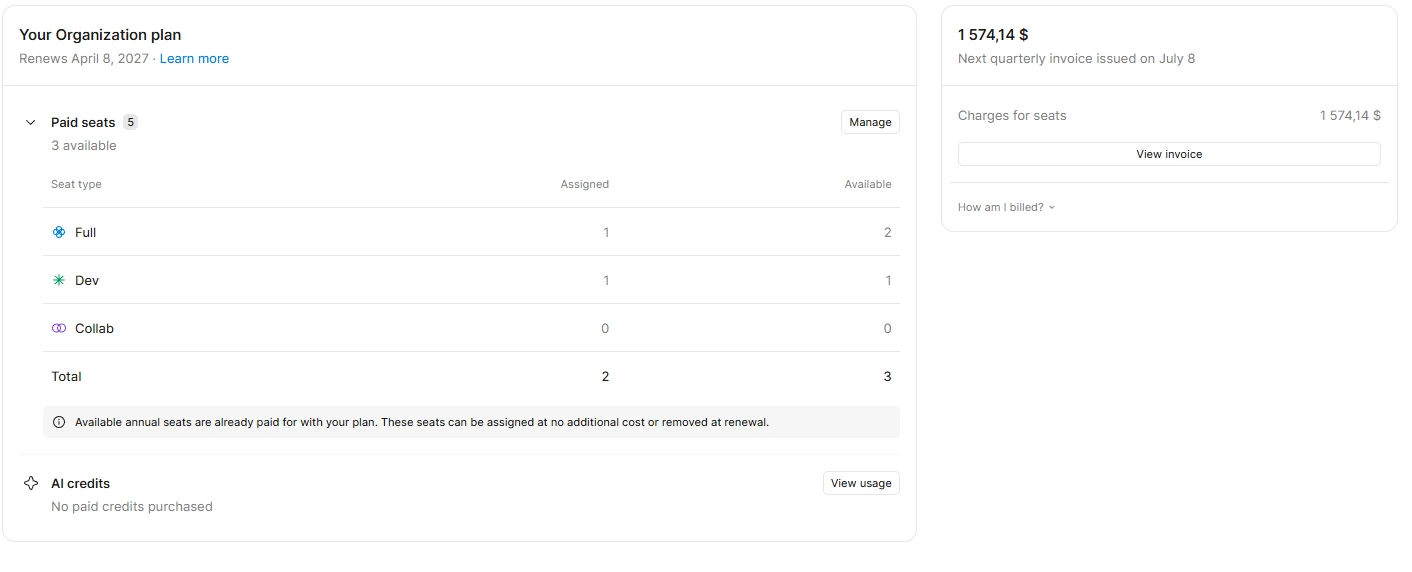
However, it seems that 3 additional seats may have been added to my organization by accident. I do not need these extra seats — I only need 2 seats in total: 1 Dev and 1 Full.

Figma currently shows that I have 3 available seats, but I couldn’t find a way to remove them. It also shows that my next quarterly invoice will be $1,574.14, which is beyond the budget I had planned.

Could you please help me remove these extra seats and adjust the upcoming invoice? The quarterly invoice is scheduled for July 8.

Thank you very much for your help.
 

1 reply

  • Figmate
  • June 29, 2026

Hi ​@Alex SXR,


I understand that you accidentally added additional seats to your organization, and you're looking to remove them and adjust the upcoming invoice on July 8.

Since we're unable to assist with individual billing issues directly here on the Forum for privacy and security reasons, I'll go ahead and create a support ticket(#1987755) on your behalf so our team can take a closer look. Someone from our team will follow up with you directly via the ticket email, please continue the conversation there.


In the meantime, you may find this section of the help article helpful:

Please note that as mentioned in the article, prorated refunds are not issued when removing or downgrading a seat mid-billing period. The seat can still be used by someone else until the period ends, and any adjustments can be made at your next renewal.


Thanks,