

Question

'Go to main component' link missing when I right click on components instances

  • July 13, 2026
  • 3 replies
  • 31 views

Peter_Carleton1

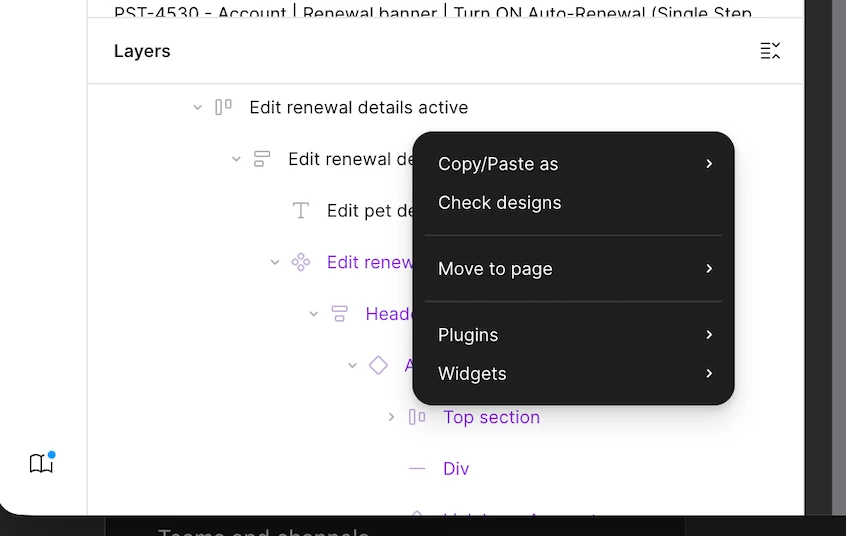
The ‘Go to main component’ link is missing when I right click on components instances in the lefthand menu.

I’m getting a smaller list of options, see attached image.

I’ve restarted my machine twice, and I’m an Enterprise admin so I have access to the design system file.

Can someone help with a fix, please?


3 replies

Tom Reem
Figmate
  • Figmate
  • July 13, 2026

Hey ​@Peter_Carleton1 — thanks for flagging this and for the screenshot.

I see what you mean. What jumps out to me is that your whole right-click menu is short, not just the Go to main component link. A few things to check:

  1. Which mode are you in? Have a look at the toolbar at the bottom center of the canvas and confirm you're in Design mode (rather than Dev Mode, Motion, or Draw). Component navigation like this is available in Design mode, so switching back is the first thing I'd try.
    Design mode on toolbar


  2. Try right-clicking the instance directly on the canvas (not just in the layers panel) and let me know if the fuller menu appears.
  3. A few designers hit something similar, and the solution was often about where the file lives. As one member put it in this thread: “I was having this problem, no link to the master in the team library. But then realized the file I was working in was in the Drafts section. When I moved it into a team project where the library is, the links reappeared.” It's worth checking whether your working file is in Drafts rather than in the team project where the library exists.

Please give those a try and let me know what you find — if the menu's still short in Design mode, we'll take a closer look at the file itself.


Peter_Carleton1

I am in design mode and I’ve got to the bottom of it now.

When I click on it first time I get the limited menu screen grabbed above, when I click a second time the full menu appears.


Tom Reem
Figmate
  • Figmate
  • July 15, 2026

Hey ​@Peter_Carleton1 — appreciate you confirming, and glad you got to the bottom of it.

That screen recording is very helpful. A single right-click on an instance in Design mode should bring up the full menu the first time. I tried to reproduce it on my end but couldn't get the same first-click/second-click pattern to occur.

So I can pass along as much detail as possible to the team, would you mind sharing a few more things when you have a moment?

  1. Are you seeing this in the Figma Desktop App, a browser, or both? If it's the app, can you confirm there are no pending updates (I’m testing on version 126.6.14)?
  2. Does it happen in every file, or just this one? That'll help us tell whether it's file-specific.
  3. What operating system and device are you on, and does it still happen if you try on a different computer?

Again, glad you're unblocked in the meantime and we'll keep an eye out for any further reports. 🙏🏻