

Question

get_design_context does not work (local/remote MCP Server)

  • November 12, 2025
  • 3 replies
  • 198 views

Imanol

Hi! 


Two weeks ago we tried get_design_context in local MCP Server in order to generate JSF and Primefaces code from a Figma design, using a selection in Figma Desktop app. 


It worked quite well. But now, when I try to do the same, it does not work from VSCode Agent. I kep getting this error: 
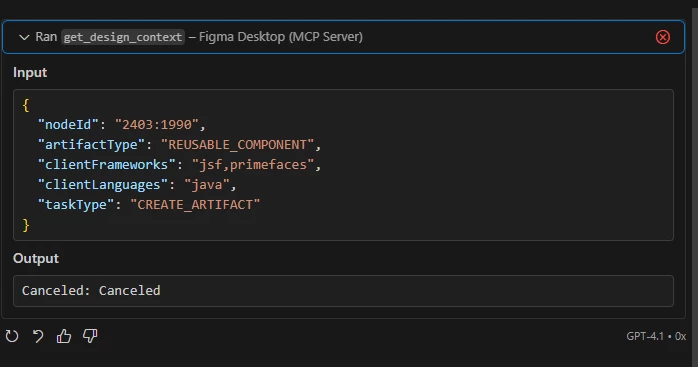


If i try to use the remote MCP server, I get another error: 
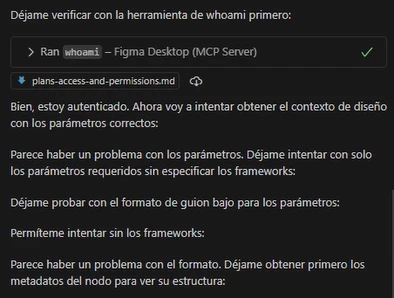


In spanish, it says that “there is a problem with the parameters”.


Is there any problem with this Tool get_design_context? Am I doing something wrong?


Thanks in advance

3 replies

EmePani
  • New Member
  • November 14, 2025

Hi there! Same here. Anybody could help us? 🙏🏽


carraes
  • New Member
  • November 18, 2025

Same problem here, it just times out.


imanol00
  • New Member
  • November 19, 2025

Hello again,


Yesterday, I tried another approach. The designer created a very simple component in Figma (around 1k tokens in size), and it worked as expected—the local MCP server called get_design_context without any errors.


Then, she made a container with three instances of this component, and that worked too. However, as the container grew in size (six instances, around 5–6k tokens), the call to get_design_context started to fail. As ​@carraes  mentioned in his message, it seems like a timeout. But I am quite sure that, about two weeks ago, I was able to generate a prototype of a component larger than 10k tokens using the local MCP server.


@carraes, could you please tell us how you reproduced this issue?


Regards