Question

Formatting issues when copying text with mixed bold styles from Figma Make

  • January 14, 2026
  • 1 reply
  • 16 views

洋芋123


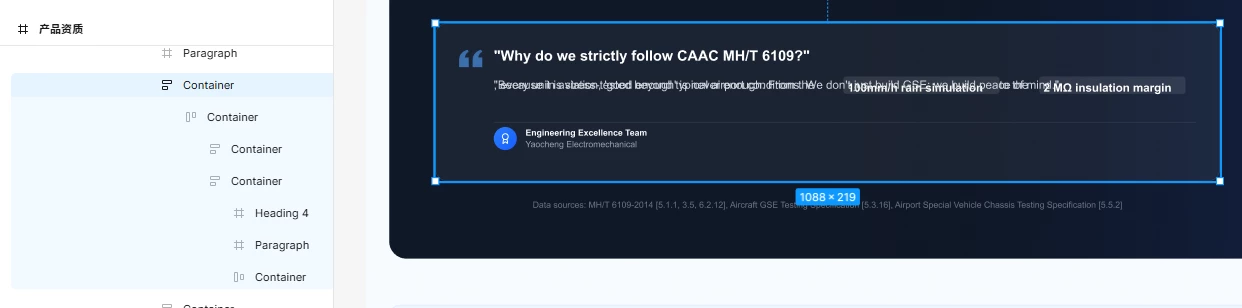
Description: > When using "Figma Make" to generate designs, I've encountered a consistent layout issue. Specifically, if the generated content contains a paragraph with interspersed bold text, copying and pasting that content into Figma results in broken formatting or layout glitches.

Reproducibility: This issue is 100% reproducible every time.


Figma Make



1 reply

Celine_
Figmate
  • Community Support
  • January 22, 2026

Hey ​@洋芋123 , Celine from Figma here, thanks for flagging this and for sharing screenshots. That context is really helpful.

As a first step, here are a few steps you can try for the formatting issues you’re seeing when copying content with mixed bold text:

  • Click Refresh preview at the top of the Make preview to see if the layout updates correctly.

  • If that doesn’t help, try refreshing the entire page, then test the content again in your Make file.

  • You can also duplicate the Figma Make file and try again in the copy.

If the formatting still breaks after trying these steps, the next best step would be to report this as a bug, especially since the issue is 100% reproducible. That will allow the team to investigate the copy/paste behavior more closely. You can submit a bug report via our Support Hub here:  https://help.figma.com/hc/en-us/requests/new
(Click Start a chat, then type “Submit a bug report” to get started.)

Once it’s submitted, the team can take a closer look and loop in Engineering if needed. Thanks again for the clear repro details!