

Question

Font weight mismatch after editing text

  • April 13, 2026
  • 1 reply
  • 28 views

Yanny Cheng

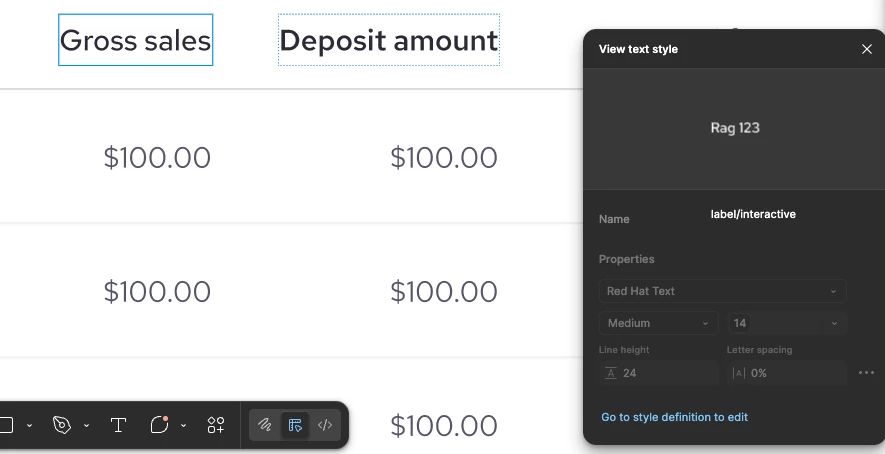
We’re using variables for all font styles with Red Hat Text and noticed an issue with font weight, “Medium” particularly. When we double click and edit a text field, the font weight visually changes, but it still shows as “medium” in Figma. This doesn’t only happen to my file but everyone else shared the same set design system in our organization.

I’m not sure if this is due to the installed font or a figma display issue. In the screenshot, “Gross sales” shows the updated (incorrect) appearance after editing, while “Deposit amount” reflects the original expected style.

Does anyone has the same issue or has any idea why this happen? Thank you.


1 reply

AskDave
Figmate
  • Figmate
  • April 14, 2026

Hi Yanny,


Dave here from Figma’s community support team 😊


Thanks for taking the time to share this, I can imagine how confusing it is when the text suddenly looks off even though nothing seems to have changed on the surface.

What you’re seeing is usually down to conflicting font versions rather than the variable itself. Even though Figma still shows “Medium”, the rendering can shift after editing if different editors (or your org) are using slightly different versions of the same font.

A couple of things worth checking:

  • Make sure everyone is using the exact same version of Red Hat Text
  • If the font is both installed locally and uploaded to your org, that can sometimes cause conflicts
  • Figma will prioritise org fonts over local ones, so it helps to standardise on one source

To fix existing text layers, you can try:

  • Select the affected text
  • Run “Recompute text layout” (via quick actions)

If it’s happening across multiple files, the cleanest fix is:

  • Uninstall the font from all machines
  • Reinstall the same version from a single source
  • Restart Figma

If it’s still happening after that, it’d be worth submitting a bug report with a file link so the team can take a closer look, to do this, visit our support hub