

Henry Agnew
New Member
May 24, 2025
Solved

[Fixed] Figma sites: center-aligned frames not publishing correctly

  • May 24, 2025
  • 13 replies
  • 809 views

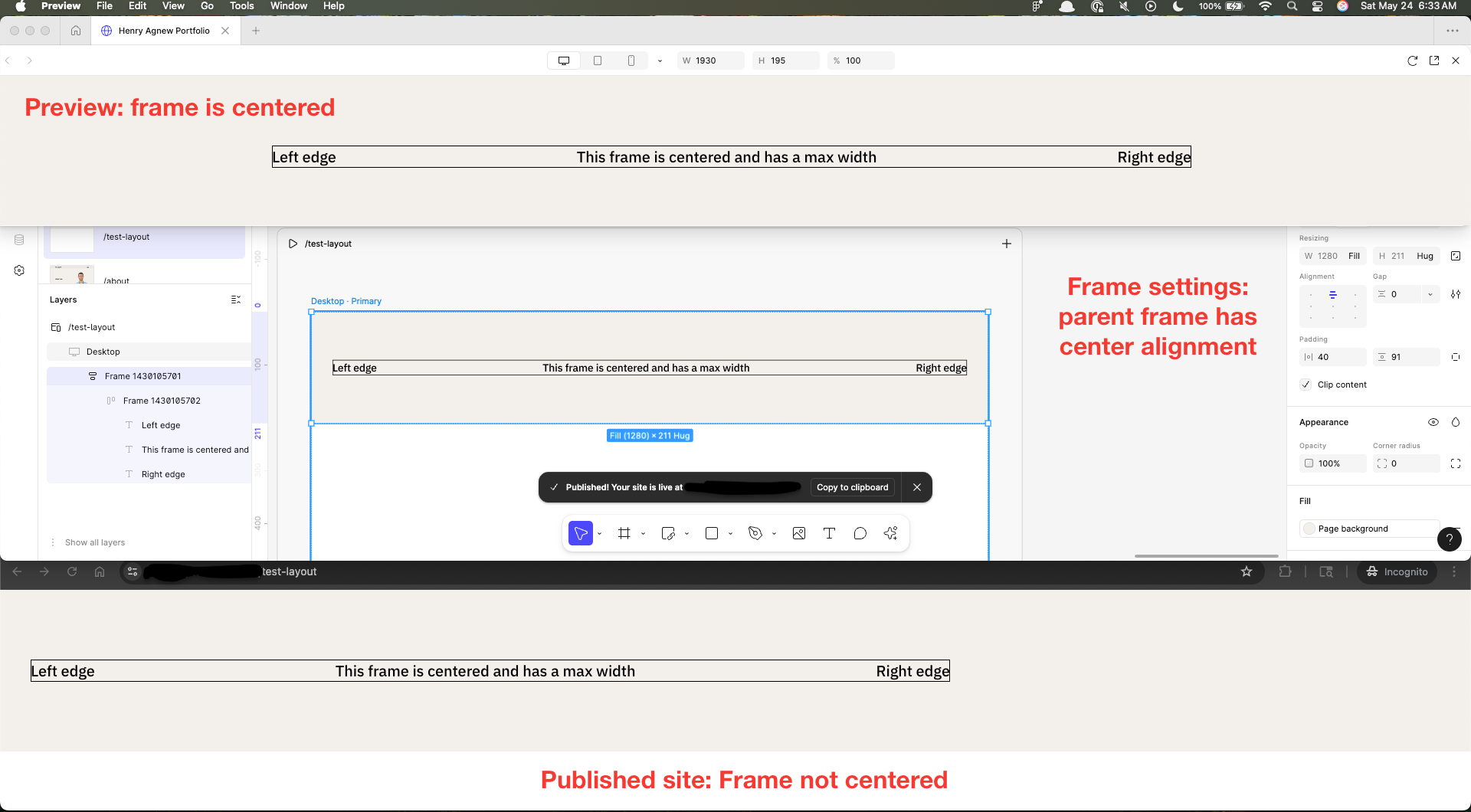
Hi! I first had this problem today, with designs that previously published correctly: center-aligned frames are publishing as left-aligned divs. See example below showing (top to bottom) 1) Previewing page within Figma Sites, 2) Autolayout settings, 3) Published page as displayed in Chrome



This topic has been closed for replies.
Best answer by y_toku

Hi all, 


Thanks for your patience. Our engineering team has deployed a fix. The issue should now be resolved! Could you please try either reloading the file or restarting your Figma app?  Let us know if the issue persists.

Thanks again for flagging and your patience!


Toku

13 replies

Bagas Al Haekal Nasution
New Member
May 24, 2025

I Have the same issues today

Jafari Mulla Ghany
New Member
May 26, 2025

I also just encountered this issue/bug, in the previous version it was still aligned center when published, but today when I did an update in the design and then published it again, it became aligned left even though the parent was already aligned center. Is this a bug that has not been solved or maybe there is already a solution?

PRyan
New Member
May 26, 2025

I Have the same issues today, Anyone has a solution?

M0rel
New Member
May 26, 2025

Same issue here. 


On March 23rd, alignment in production was looking just the same as in Figma Sites. Two days later I published it again, just with content updates. Then all the Auto-layout containers, in all pages, were sticked to the left, regardless of changing them back and forth on Auto-layout settings.

Mihya
New Member
May 26, 2025

I also have the same issue. Last night, I spent quite a lot of time thinking I messed something up. I tried rebuilding the whole page section by section, and it worked at first but suddenly broke randomly and became unfixable.

prayminder
New Member
May 26, 2025

Same issue here, noticed today after publishing. It doesn’t happen for all frames, but I don’t see a pattern.

I also remember this happen once more some days ago, but it got fixed once I re-published. Unfortunately this doesn’t work now, I’ve re-published and it’s still broken.

Martin_Slovik
New Member
May 26, 2025

I have the same problem. It’s centered while I’m editing it, but when I publish it, it’s aligned to the left.

ana.bolio.ayora
May 26, 2025

Im having the same issues. Is there a fix? The prototype looks fine but when i publish, it aligned to the left, even if i align it to the right

y_toku
Figmate
Community Support
May 27, 2025

Hi all,


Thanks for bringing this issue to our attention. Our team has already created an internal report about this, and I'll keep you updated once I have any information I can share.

Thanks your patience while we look into this!


Toku

robertlaskus
New Member
May 27, 2025

@y_toku any updates on this topic?