[redacted by moderator to remove personal information] and [redacted by moderator to remove personal information] are the same gmail accounts. Just I purchased domain for my gmail account, and my figma files removed
Thanks for flagging this, and sorry to hear about the trouble with your files. Based on what you described — purchasing a domain for your Gmail account — there's a good chance your Figma files are still tied to your original Gmail address. If that email address changed when you set up the custom domain, you may now be signed into a different Figma account.
A few things worth checking:
Make sure you're signed into the right account. You can switch accounts from the top-left or top-right corners of the file browser. Try signing in with your original Gmail address to see if your files are there. For an illustration of this, have a look here: Switch between accounts.
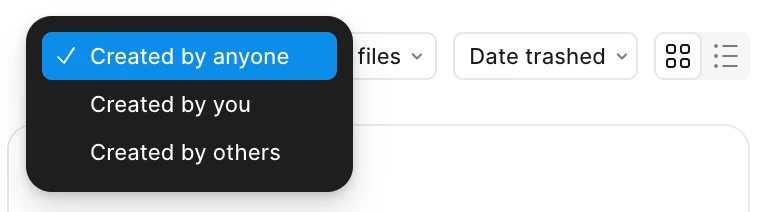
Check your deleted folder (Drafts → Deleted). If files are there, right-click to restore. Note: If a teammate deleted or moved files, you may need to switch the view from Created by me to Created by anyone to find them. Switch to “Created by anyone” filter.
Check if files were moved by a teammate who also had access.
If those steps don't get you where you need to be, the Product Support team can investigate behind the scenes. You can reach them via the Support Hub → click Start a chat. If you have the file URLs, include them in your message. You might find them in your browser history, past emails or messages, or via File → Recently Closed Tabs in the Figma Desktop App.
Also, I removed some personal information from your original post to protect your account security. Appreciate your understanding.
Thanks for flagging this, and sorry to hear about the trouble with your files. Based on what you described — purchasing a domain for your Gmail account — there's a good chance your Figma files are still tied to your original Gmail address. If that email address changed when you set up the custom domain, you may now be signed into a different Figma account.
A few things worth checking:
Make sure you're signed into the right account. You can switch accounts from the top-left or top-right corners of the file browser. Try signing in with your original Gmail address to see if your files are there. For an illustration of this, have a look here: Switch between accounts.
Check your deleted folder (Drafts → Deleted). If files are there, right-click to restore. Note: If a teammate deleted or moved files, you may need to switch the view from Created by me to Created by anyone to find them. Switch to “Created by anyone” filter.
Check if files were moved by a teammate who also had access.
If those steps don't get you where you need to be, the Product Support team can investigate behind the scenes. You can reach them via the Support Hub → click Start a chat. If you have the file URLs, include them in your message. You might find them in your browser history, past emails or messages, or via File → Recently Closed Tabs in the Figma Desktop App.
Also, I removed some personal information from your original post to protect your account security. Appreciate your understanding.