

Julies_Nguyen
New Participant
April 15, 2026
Question

Figma SLOT is breaking my design

  • April 15, 2026
  • 3 replies
  • 95 views

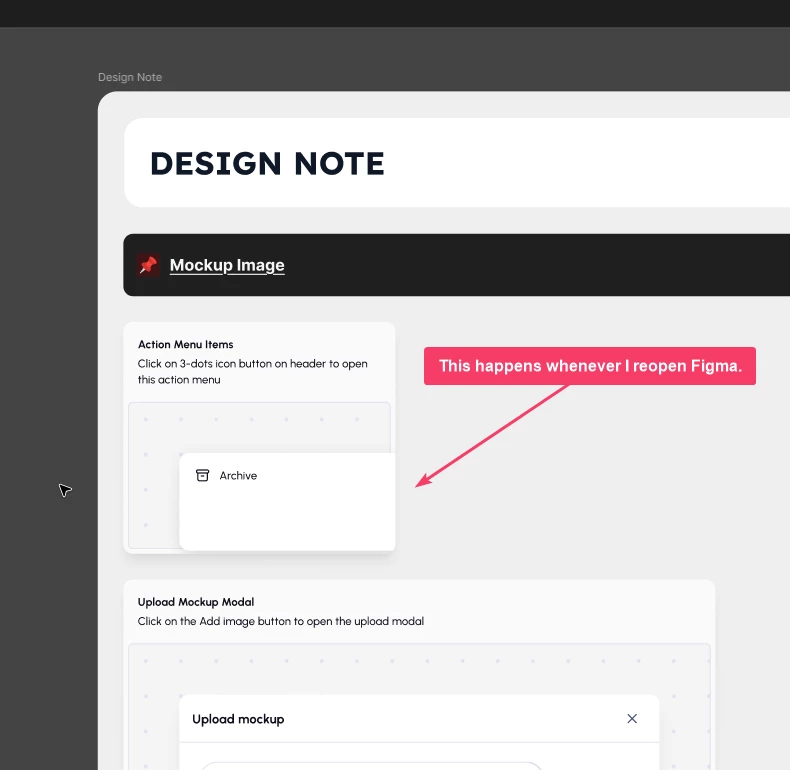
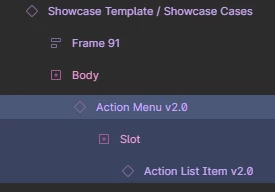
I use a SLOT to change the number of Action List Items in the Action Menu; the width of the Action List Items relies on its parent, the Action Menu. But whenever I open Figma, the SLOT does not keep my current width/height settings. I thought it was a function of the SLOT, but no; when I click on that Action Menu, it updates its size but still does not use my correct settings.
 

3 replies

Figmate
April 15, 2026

Hi ​@Julies_Nguyen


I understand you're seeing a layout issue where a slot component isn't respecting the width/height settings you've applied.


I could see the behavior you described in your recording.

I've gone ahead and created a support request(#1850246) on your behalf so our team can investigate this further. You'll receive a confirmation email for this ticket shortly.

When you receive that email, could you please reply directly to it with the following?

  • A direct URL to the affected Figma file.
  • Please also share view access for that file with support-share@figma.com. (This is our official support account, and you won't be billed for this.)

We're unable to look at individual files directly from the forum due to security and privacy concerns, but providing this information in the ticket will allow our team to investigate effectively and assist you directly.


Thanks for your help!

Saroj Gurung
New Member
September 16, 2026

Has this been fixed? I’m having to do double clicks on god knows how many designs and hoping it goes back to the last updated result because the design breaks next time i come to the design.


And then 3 weeks later when devs take the ticket and then realise the design is broken again

adamsmasher
Figmate
Figmate
September 17, 2026

Hi, ​@Saroj Gurung. Thanks for your reply - I can appreciate your frustration when your designs behave and render in unexpected ways.


Are you seeing this specifically with component instances that have slots? If so, can you try regenerating all instances with the option found in the Actions menu (click on the Actions icon on the right of the bottom toolbar, then search for “Regenerate”). Let me know if that doesn’t help, and I’ll create a ticket for you with our Technical Quality team to investigate.