
Question

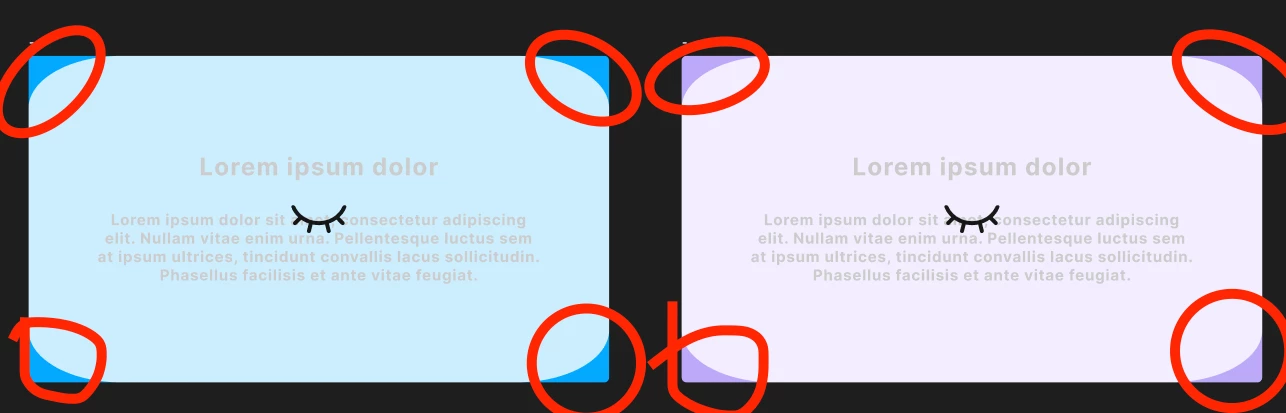
[Figma Slides] Skip Slides have a rounded edge
  • April 27, 2026
  • 5 replies
  • 40 views

mardeleons
Rounded corner

Hello, I am not sure if this is intentional or not. Hidden/skip slides now have this oval fillet in the corners.

5 replies

Jaycee Lewis
Figmate

Hey, ​@mardeleons 👋 Thanks for your post. Can you tell me a bit more about this issue, please?

  • Where is this happening? For example, I found a similar thread where this was happening while exporting Slides as a PDF
  • Can you reproduce this when creating a few default slides? I’d like to set up my test the same way you are doing it

Thanks! — Jaycee 


mardeleons
  • Author
  • New Member
  • April 27, 2026

Hi  ​@Jaycee Lewis,

yes it happens also when i create a new slides from a new default template. 

Below is a step by step from a new figma slide → template → Skip Slide.

Let me know if you need any more information to recreate the problem for your testing!


Thank you,

Martin


de_la_Puente_Pantoja_Alberto

Hello, same bug here. It happens in all of our files.


mardeleons
  • Author
  • New Member
  • May 3, 2026

The problem is fixed.

The slides no longer have a corner issue when the slides are “skip” mode.


Thank you!


de_la_Puente_Pantoja_Alberto

Thank you! I saw the fix :)