

Figma Slides: Custom fonts have suddenly stopped working since recent update
Description
Since a recent Figma update, custom fonts are no longer being recognised in Figma Slides. When editing text, the "Missing font" dialog appears for fonts that are installed and have been active throughout the project.
This issue appears isolated to Figma Slides; I haven't confirmed whether it affects Figma Design files.
Environment
- macOS: 26.3.1 (a) (25D771280a)
- Figma Desktop: version 126.3.12
- Font manager: RightFont
- Fonts affected: Any custom, loaded font (i.e. Cooper Lt BT, Cooper Md BT, TT Norms Pro, YWFT Coopera)
Steps to reproduce
- Open a Figma Slides file that uses custom fonts
- Attempt to edit a text layer
- Missing font dialog appears for fonts that are installed or activated
Expected behaviour
Figma recognises installed fonts and renders text correctly without prompting for replacements.
Actual behaviour
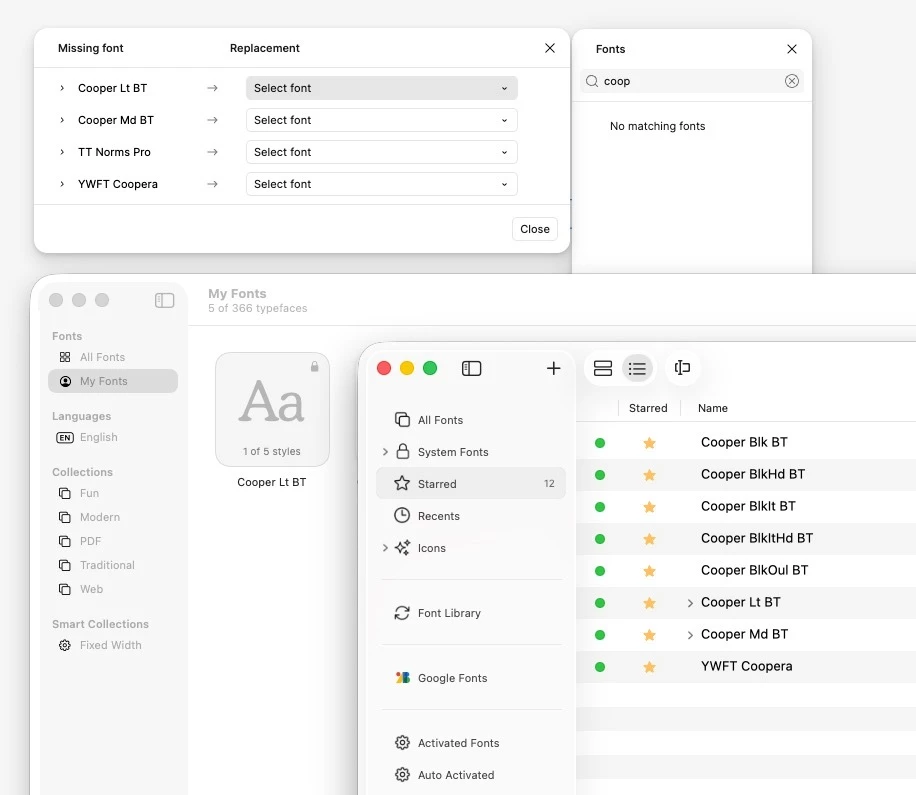
Missing font dialog is shown for all custom fonts. Fonts are confirmed as installed and activated (see screenshot).
What I've tried
- Reloading the browser tab / restarting the desktop app
- Deactivating and re-activating fonts in RightFont
- Installing fonts directly via macOS Font Book
- All fonts appear correctly in RightFont's font list and are marked as active
Screenshot
Additional context
This started following the update to Figma Desktop version 126.3.12; it is the only change to my environment. The fonts have been in use in this project since it was created with no prior issues.