Question
Figma Sites rendering issue with grouped card section
New to Figma.
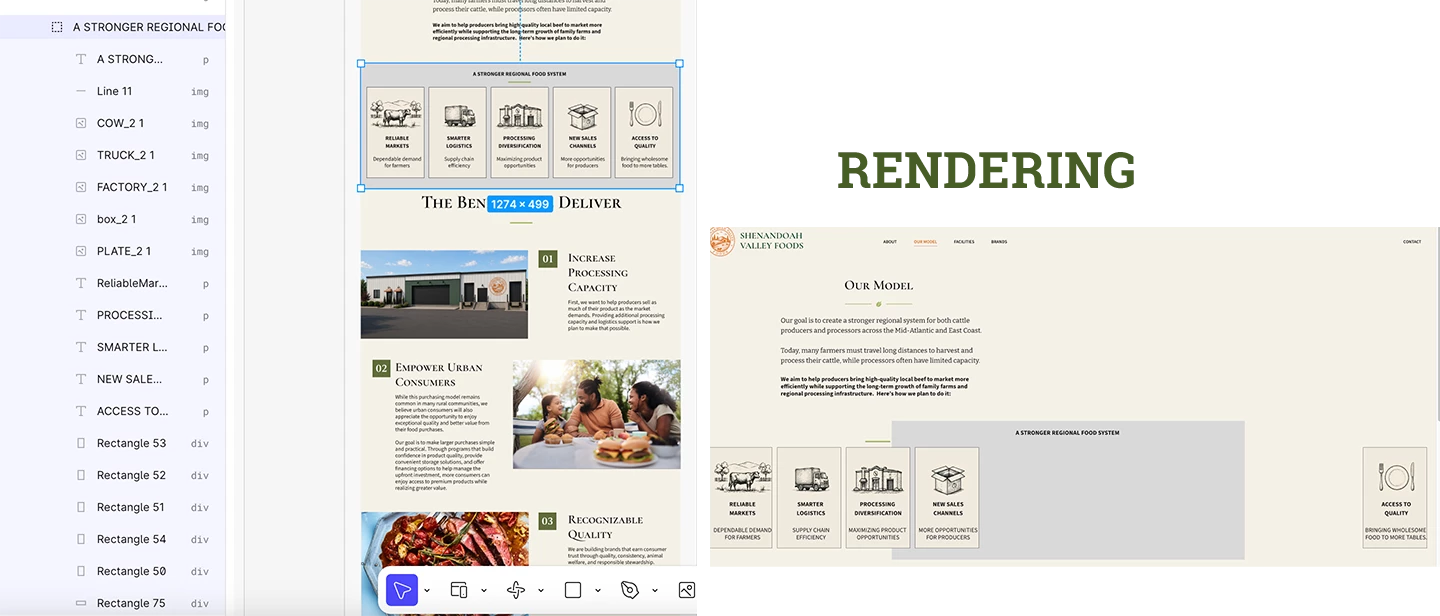
I have a section consisting of 5 cards (image, headline, body copy, and background rectangle for each card).
In the editor, the section displays correctly and fits within the page width.
After publishing, the cards are rendered far apart across the page, with one card pushed to the far right and the others separated from the container.
Troubleshooting performed:
- All elements were regrouped into a single group.
- Issue persists after publishing.
- Converting the group to Auto Layout (Shift-A) made the layout worse and redistributed elements into a grid.
- Individual elements within the section are shown as Position: Absolute.
- Relative is unavailable (grayed out).
- The parent section is also shown as Position: Absolute.
- Please shoot me.
I made the box grey here so you can see how I organized the cards. I had to attach how it’s displaying - but basically the boxes are allover the place.
I am new - please explain like you’re explaining to a dummy. Use baby Figma language I can understand.