Question

Figma Sites pages are crawled by Google but not indexed – possible Google indexing issue?

  • August 10, 2026
  • 1 reply
  • 29 views

James Jasper

Hi Figma team,

I built our business website using Figma Sites and connected it to a custom domain:

https://niio.apsm.com.tw/

We are currently experiencing a Google indexing issue affecting multiple pages on the website, and I would like to know whether this could be related to Figma Sites.

Google Search Console currently reports:

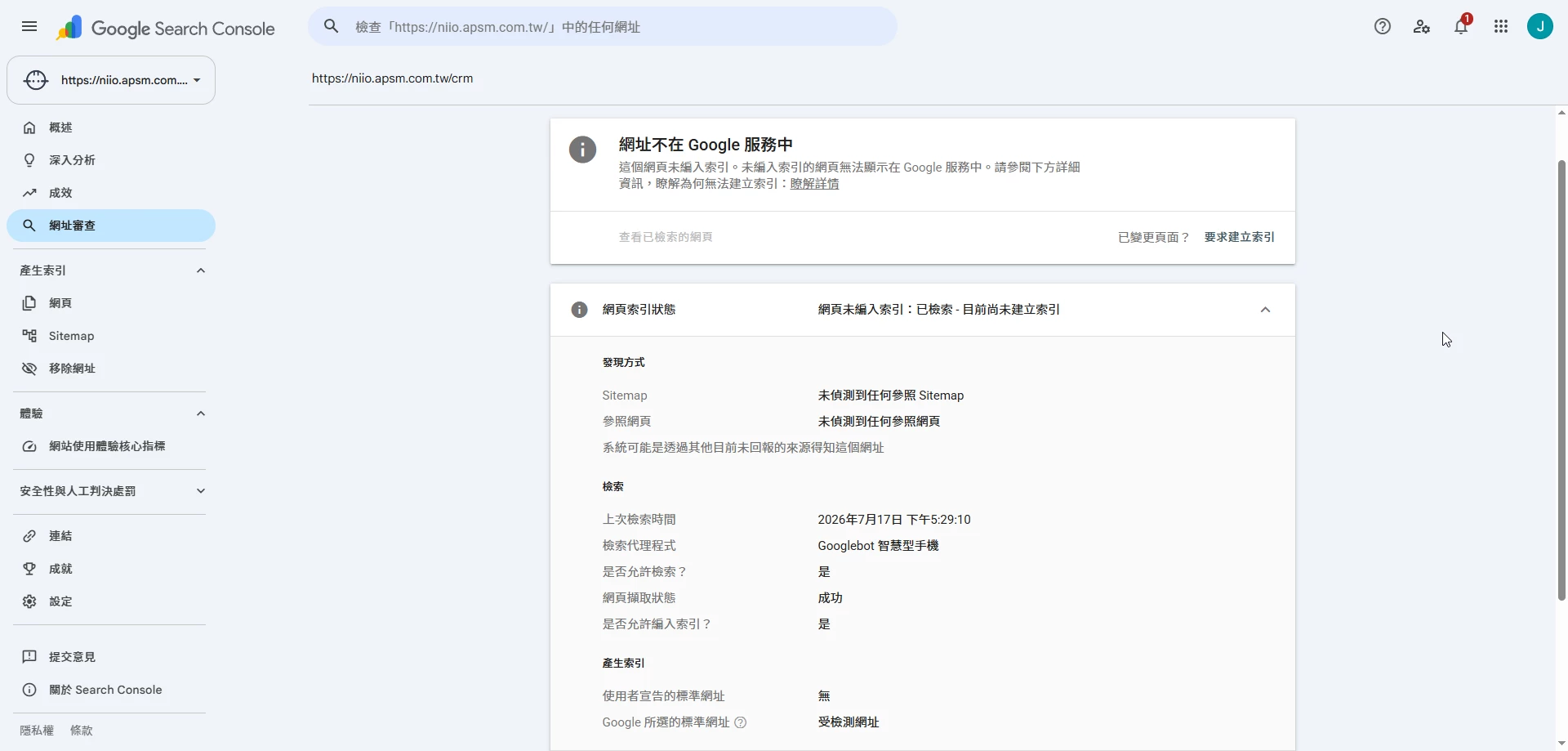
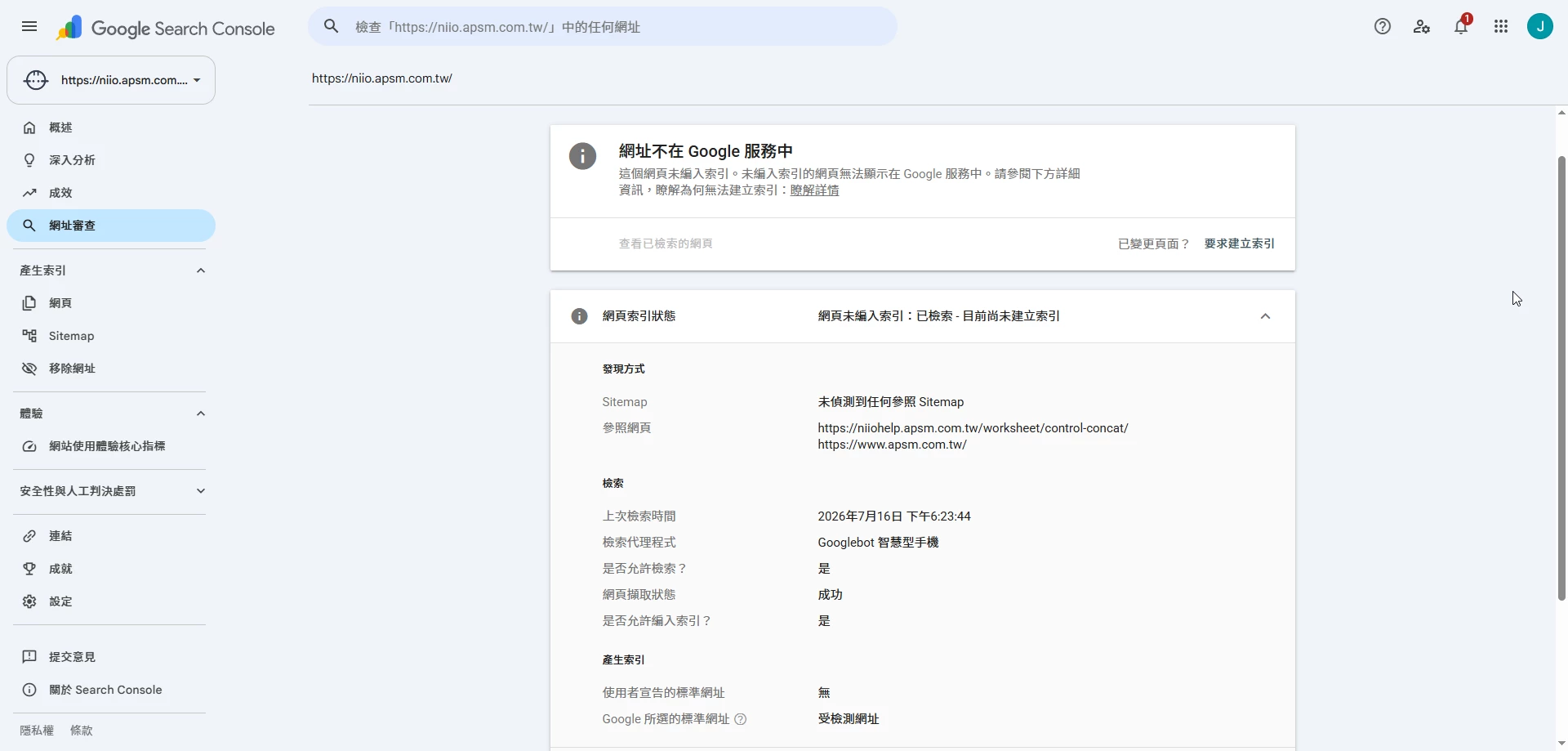
“Crawled – currently not indexed”

for approximately 15 pages, including our homepage and several important product pages.

One example is:

https://niio.apsm.com.tw/crm

What I have already checked

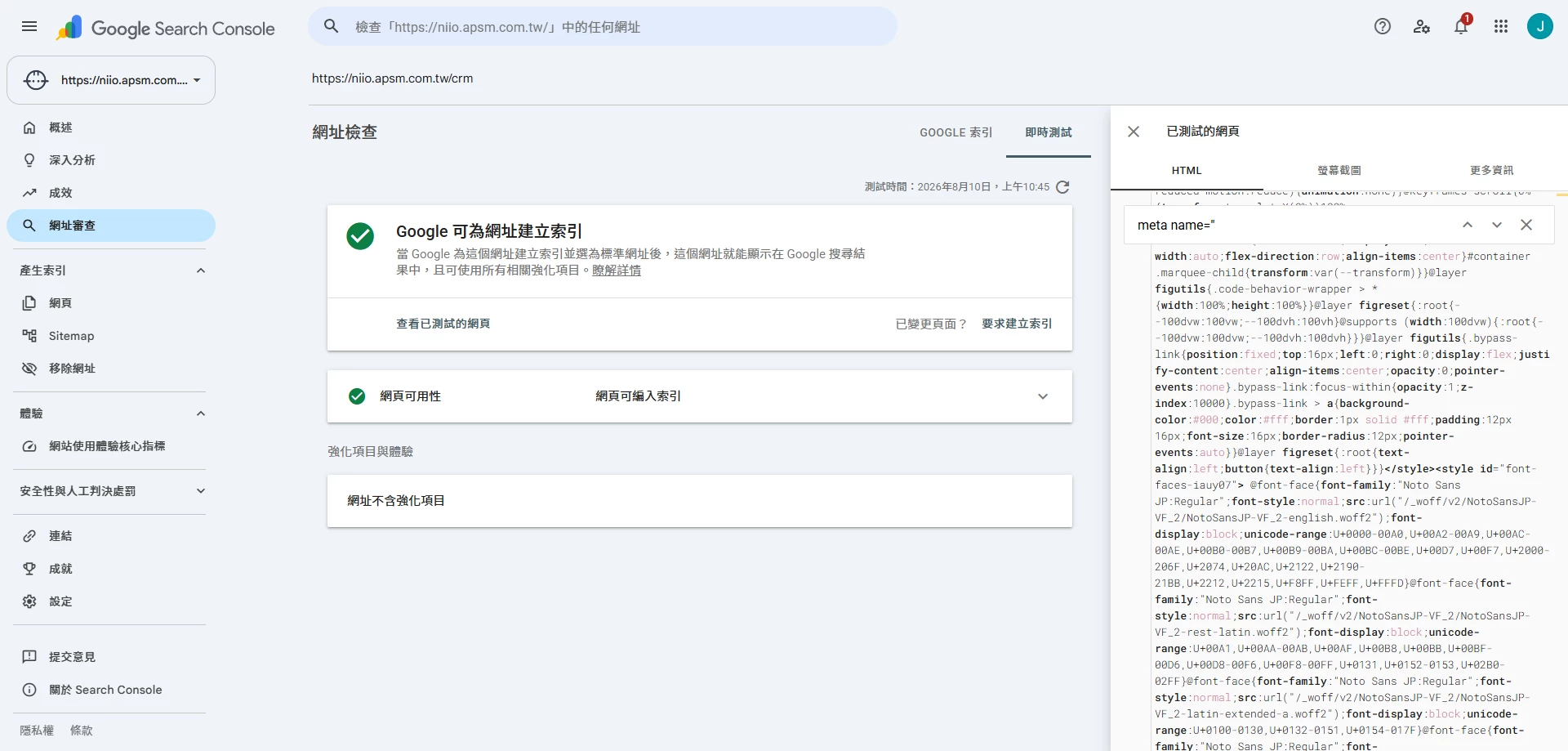
I tested the /crm page using Google Search Console → URL Inspection → Test Live URL.

The results show:

  • The URL is available to Google.
  • Crawling is allowed.
  • Page fetch is successful.
  • Indexing is allowed.
  • Googlebot can render the page correctly.
  • The page content and text are present in the HTML received by Google.
  • Google-selected canonical is the inspected URL itself.
  • There is no noindex directive blocking the page.

I also checked the rendered screenshot provided by Google's Live URL Test, and the page renders correctly with its content visible.

However, despite all of the above, the page remains:

“Crawled – currently not indexed.”

Desktop / Tablet / Mobile breakpoints

Our website uses separate Desktop, Tablet and Mobile breakpoints in Figma Sites.

I initially suspected that the same content might appear multiple times in the generated HTML because of the three breakpoints.

However, I checked the HTML returned by Google's Live URL Test and searched for unique text from the page. The content appears only once.

Therefore, I currently do not see evidence that the breakpoints are creating duplicate copies of the page content for Google.

robots.txt and Sitemap

I found another issue that may be relevant.

This URL currently returns 404 / Not Found:

https://niio.apsm.com.tw/robots.txt

However, Figma Sites does provide a sitemap:

https://niio.apsm.com.tw/sitemap.xml

The sitemap is accessible and contains the affected URLs. For example, /crm is explicitly included in the sitemap.

The sitemap has also been successfully submitted to Google Search Console.

However, when inspecting /crm and some other URLs, Google Search Console shows:

“No referring sitemaps detected”

even though these URLs are present in sitemap.xml.

For at least one article page, the Sitemap field in URL Inspection has also shown:

“Temporary processing error.”

This seems unusual because the sitemap itself is accessible and contains the URLs.

Similar discussions in the Figma Community

While investigating this issue, I found several existing discussions in the Figma Community regarding Google indexing, robots.txt, sitemap handling and SEO limitations with Figma Sites.

In particular, I found reports from other Figma Sites users about missing robots.txt files and websites not being indexed by Google.

My case appears slightly different because Google Search Console confirms that Googlebot can successfully crawl, render and read the content, and the pages are technically allowed to be indexed.

The issue is that Google crawls the pages but still does not add them to its index.

Could the Figma Sites team please help confirm:

  1. Are there any known Google indexing issues currently affecting websites published with Figma Sites?
  2. Is it expected for a Figma Sites website using a custom domain to return 404 for /robots.txt?
  3. Could the missing robots.txt affect Google indexing, even when Google Search Console reports that crawling and indexing are allowed?
  4. Is the sitemap generated by Figma Sites expected to be fully recognized by Google Search Console?
  5. Is it expected that Google URL Inspection may show “No referring sitemaps detected” even when the inspected URL is clearly included in the Figma Sites sitemap.xml?
  6. Are there any known SEO/indexing limitations related to the HTML structure generated by Figma Sites?
  7. Are there any Figma Sites-specific settings or recommended steps that we should check?

I understand that Google ultimately decides which pages to index, so I am not assuming that this is necessarily a Figma Sites bug.

However, because multiple pages on the same Figma Sites website have the same “Crawled – currently not indexed” status, while Googlebot can successfully crawl, render and read the pages, I would like to rule out any known Figma Sites issue related to robots.txt, sitemap handling, generated HTML or Google indexing.

I have attached a screenshot from Google Search Console showing the indexing status. I can also provide screenshots of the successful Live URL Test and Google's rendered page/HTML if needed.

Thank you for your help.


1 reply

James Jasper
  • Author
  • New Member
  • August 10, 2026

Additional question: GA4 / Google Tag Manager tracking on Figma Sites

I would also like to add another issue we have encountered while using Figma Sites as a business website.

This is related to Google Analytics 4 (GA4) and Google Tag Manager (GTM) tracking.

We would like to understand whether this behavior is expected in Figma Sites and what the recommended implementation is.

1. Page navigation and GA4 events

Navigation between pages in our Figma Sites website appears to behave similarly to a Single Page Application (SPA) or client-side navigation.

For example, we created a GA4 event:

view_crm_page

to identify visits to:

/crm

If a visitor enters /crm directly as the first page of their session, the event can be detected correctly.

However, if a visitor first enters another page, such as:

Homepage → CRM

and then navigates internally to /crm, the event does not appear to be triggered in the same way as a traditional page load.

This makes page-level analytics difficult because GA4 may not consistently record internal page navigation using the same method as a normal multi-page website.

2. Button / CTA click tracking

We are also having difficulty reliably tracking button and CTA click events using Google Tag Manager.

For example, on our CRM page we would like to measure interactions such as:

CRM page → “Request a Trial” button → Form → Form submission

Ideally, we would like to create GA4 events such as:

view_crm_page

crm_trial_click

trial_form_start

trial_form_submit

so that we can measure the complete conversion funnel.

However, the HTML elements generated by Figma Sites do not appear to provide stable and user-configurable identifiers such as:

  • HTML id
  • stable CSS classes
  • data-* attributes
  • analytics/event identifiers

that we can easily assign to specific buttons or interactive elements for Google Tag Manager.

As a result, it is difficult to create reliable GTM triggers for important CTA buttons.

We could potentially try to identify elements using visible text or generated DOM selectors, but these approaches may not be reliable if the generated HTML structure or class names change after publishing or updating the Figma Sites project.

Why this is important for a business website

For a business website, we need to measure a conversion funnel such as:

Traffic Source

Product Page View

CTA / Request a Trial Click

Form Start

Form Submission

Lead / Conversion

Without reliable page navigation and interaction tracking, GA4 can show basic traffic information, but it becomes difficult to evaluate whether marketing campaigns and individual product pages are actually generating conversions.

Could the Figma Sites team please clarify:

  1. Does Figma Sites currently use SPA-style / client-side navigation when users navigate between pages?
  2. Does Figma Sites trigger a standard browser page load when navigating internally, or does it update the URL and page content without a full document reload?
  3. What is the officially recommended method for tracking page views and custom page-view events in GA4/GTM when users navigate between Figma Sites pages?
  4. Does Figma Sites support GA4/GTM History Change or another event that can reliably detect internal navigation?
  5. What is the recommended method for tracking button clicks and CTA interactions using Google Tag Manager?
  6. Is there currently a way in Figma Sites to assign a stable HTML id, CSS class, data-* attribute, or another custom analytics identifier to a specific button or interactive element?
  7. If this is currently not supported, is there another recommended way to uniquely identify buttons for analytics tracking without relying on generated DOM structures or visible button text?
  8. Does Figma Sites provide, or plan to provide, native support for defining custom analytics events for buttons, links, forms, and other interactions?
  9. Are there any official Figma Sites documentation or recommended practices for implementing GA4 + Google Tag Manager conversion tracking?

Our goal is not only to collect page views, but to reliably measure business conversions and understand which traffic sources and product pages generate leads.

Since Figma Sites is being used as our production business website, reliable SEO and analytics tracking are both important for us.

I would really appreciate guidance from the Figma Sites team on the recommended way to implement this.

Thank you!