

Question

Figma Professional Team Account Limitting Users Login

  • August 27, 2026
  • 1 reply
  • 29 views

AXD Devops

Hi everyone,
We are experiencing an issue with our Figma Professional account. We noticed that only 3 sessions/devices can remain active at the same time.

When we log in using a 4th device, one of the previously active sessions is automatically logged out, with the message:

“You’ve been logged out. When you logged into this device, you were automatically logged out of some older Figma sessions.”
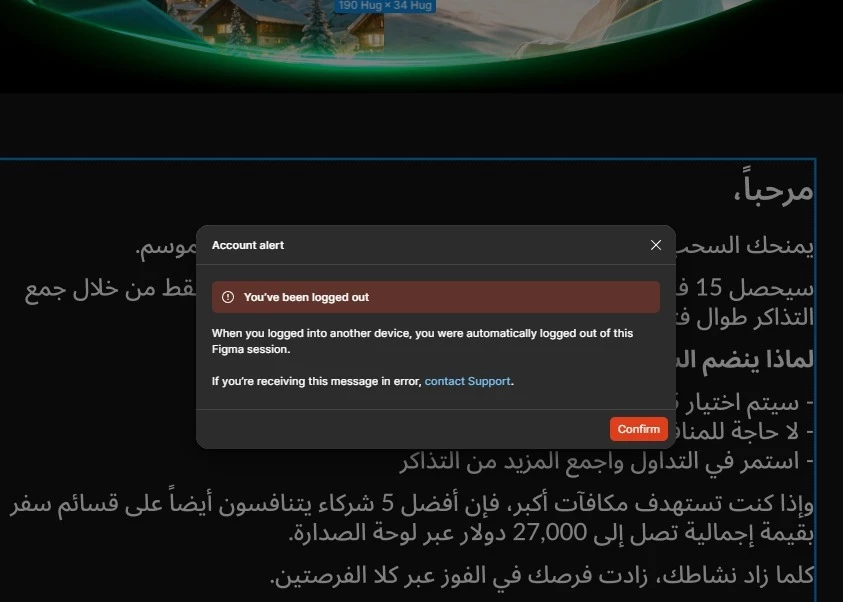
Previously, we did not experience this issue and were able to use multiple devices without one of the existing sessions being logged out.

Could you please clarify:

  1. Is there currently a limit of 3 active sessions/devices for Figma Professional accounts?
  2. Has Figma recently introduced or changed any policy regarding the maximum number of active sessions?
  3. Is there any way to maintain more than 3 active sessions/devices on a Professional account?

Could you please confirm whether this is an expected behavior or an issue with our account?

Thank you.

1 reply

Celyn_L
Figmate
  • Figmate
  • August 27, 2026

Hi ​@AXD Devops, Celyn from the Figma Community Support team here. Thanks for reaching out and for sharing the screenshot.

It sounds like multiple team members may be using the same Figma login. When this happens, older sessions may be logged out as other team members sign in.

Figma looks at a range of signals that may indicate suspicious activity or activity inconsistent with the acceptable use policy in our Terms of Service (section 2.4b), including potential account sharing, rather than enforcing a single concurrent-session limit.

If multiple people on your team need access, each person should use their own Figma account and be added to your Professional team with the appropriate seat type, such as Full, Dev, or Collab. Sharing a single login may result in sessions being logged out.

You can review your active sessions under Account > Security, where each session is listed with its device and location. If you see any activity you don’t recognize, please let us know and we’ll take a closer look. Please note that using a VPN may affect the location shown for a session.

I hope this helps clarify what you’re experiencing!