Solved

Figma Open in recovery mode

  • January 8, 2026
  • 4 replies
  • 162 views

bhavyav

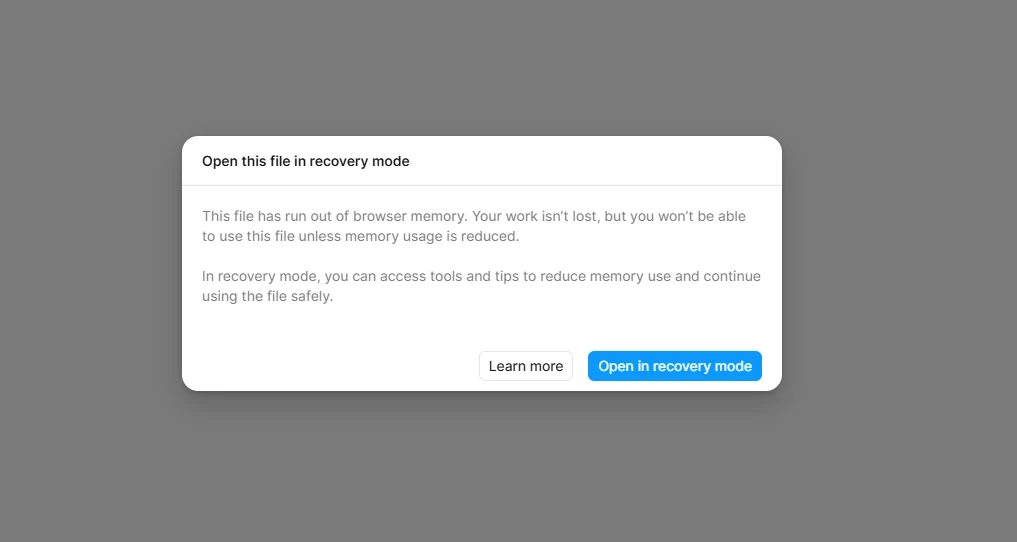
I recently encountered this error message, and even after selecting “Open in Recovery Mode,” the same pop-up continues to appear. I’m unable to open the file and need an immediate solution, as I have a client meeting tonight.

Best answer by Celine_

Hey everyone, thanks for flagging this!
This pop-up usually appears when a file has reached or exceeded the available memory limit. You can learn more about Recovery Mode and why this happens in this article
Because Figma is a browser-based app (including the Desktop App), each file is subject to the memory limits of a single browser tab. 
If loading a file exceeds the browser's available memory and can't be restored from the error message in the Editor, you may need to restore a previous version of this file from the file browser. Here's how to do this:

  1. Open the project where the file is located.
  2. In the file browser, hold down the modifier keys and click on the file thumbnail:
    • Mac: ⇧ Shift ⌃ Control ⌥ Option
    • Windows: Alt Shift
  3. Select Restore from version.
  4. Click Restore next to the appropriate version.

 
Once you're able to load your file, our Help Center has a guide on how to avoid hitting this limit again: Reduce memory usage in file


Update: I see in the backend that ​@Valeria Pashkova , your issue has been solved. Glad to see this!

 ​@bhavyav , I see that you are already in touch with the support team (thank you for doing that!). They are waiting for your response for further investigation. Please check your inbox when you can, for reference, your case number is #1675300.
 

Our engineering team has also shared that they've completed their investigation and have since released a wider change for all users that should help improve the memory usage in some file setups. We apologize again for the inconvenience !

For others,  if you’re still running into issue and unable to restore a stable version from the file browser after trying the steps mentioned above, I’d recommend reaching out directly to our support team so they can take a deeper look at the file. (This isn’t something we can fully troubleshoot from the Forum, as it requires reviewing file-specific details securely.) You can contact the support team through our Support Hub: https://help.figma.com/hc/en-us/requests/new. Thank you!

4 replies

bhavyav
  • Author
  • New Member
  • January 8, 2026

I recently encountered this error message, and even after selecting “Open in Recovery Mode,” the same pop-up continues to appear. I’m unable to open the file and need an immediate solution, as I have a client meeting tonight.


Patcharapon Phasukdee

I’m having the same issues, I was be able to open my file last weeks. but now it’s stuck in recover loop forever :(


Valeria Pashkova
I have the same problem, there is no way to even open an older version of the file to partially restore access to the file

Celine_
Figmate
  • Community Support
  • Answer
  • January 9, 2026

Hey everyone, thanks for flagging this!
This pop-up usually appears when a file has reached or exceeded the available memory limit. You can learn more about Recovery Mode and why this happens in this article
Because Figma is a browser-based app (including the Desktop App), each file is subject to the memory limits of a single browser tab. 
If loading a file exceeds the browser's available memory and can't be restored from the error message in the Editor, you may need to restore a previous version of this file from the file browser. Here's how to do this:

  1. Open the project where the file is located.
  2. In the file browser, hold down the modifier keys and click on the file thumbnail:
    • Mac: ⇧ Shift ⌃ Control ⌥ Option
    • Windows: Alt Shift
  3. Select Restore from version.
  4. Click Restore next to the appropriate version.

 
Once you're able to load your file, our Help Center has a guide on how to avoid hitting this limit again: Reduce memory usage in file


Update: I see in the backend that ​@Valeria Pashkova , your issue has been solved. Glad to see this!

 ​@bhavyav , I see that you are already in touch with the support team (thank you for doing that!). They are waiting for your response for further investigation. Please check your inbox when you can, for reference, your case number is #1675300.
 

Our engineering team has also shared that they've completed their investigation and have since released a wider change for all users that should help improve the memory usage in some file setups. We apologize again for the inconvenience !

For others,  if you’re still running into issue and unable to restore a stable version from the file browser after trying the steps mentioned above, I’d recommend reaching out directly to our support team so they can take a deeper look at the file. (This isn’t something we can fully troubleshoot from the Forum, as it requires reviewing file-specific details securely.) You can contact the support team through our Support Hub: https://help.figma.com/hc/en-us/requests/new. Thank you!