

bmpq1352
New Participant
October 2, 2026
Solved

Figma Motion exporting problem when using a shaders

Hi

When im rendering an animation using shaders to MP4 and GIF formats, an error occurred in the rendering window: "Failed to render the shader effect for this frame, so the export was stopped."
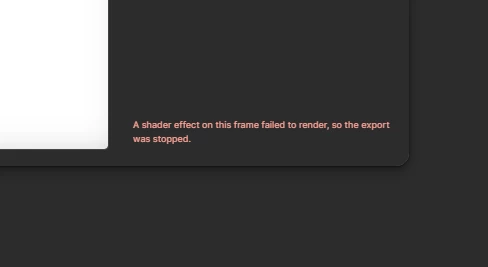
 

Sometimes there is no error, but rendering is stuck at 10% and doesn't move at all.

Animation and shaders work fine in Figma.

File with this problem - [redacted by forum moderator to remove PII]

How can I fix this?

Thanks


Render settings - MP4, high quality, and 30 fps

Windows 10 (22H2), Figma version 126.9.11, Chrome 154

bmpq1352
bmpq1352Solution
New Participant
October 3, 2026

I checked again and the problem persisted; then I went into the settings, found the "Prefer High Performance GPU" option, and enabled it—that helped solve the problem. 👍 

3 replies

Jaycee Lewis
Figmate
Figmate
October 2, 2026

Hey, ​@bmpq1352 👋 Thanks for reporting this. Are you still having the issue? I tried both export modes after animating a simple shape and shader (excuse my simple example lol). 

Please submit a bug report through the Support Hub: Support Hub > Type “Report a bug” > Click Start a chat > select Enter and follow the prompts. In the form, include the URL of the file and grant "Can View" access with support-share@figma.com, this allows us to reproduce the issue and investigate. If you can record a quick gif or screen recording of the issue happening, that will be helpful too. Thank you! — Jaycee

bmpq1352
bmpq1352AuthorSolution
New Participant
October 3, 2026

I checked again and the problem persisted; then I went into the settings, found the "Prefer High Performance GPU" option, and enabled it—that helped solve the problem. 👍 

spark_d
New Member
October 18, 2026

what settings? on figma?