

Question

Figma MCP tools are not showing up

  • December 26, 2025
  • 1 reply
  • 10 views

anandpadia25

Hi, 

I was able to make the connection with Figma MCP, but no tools are showing up.
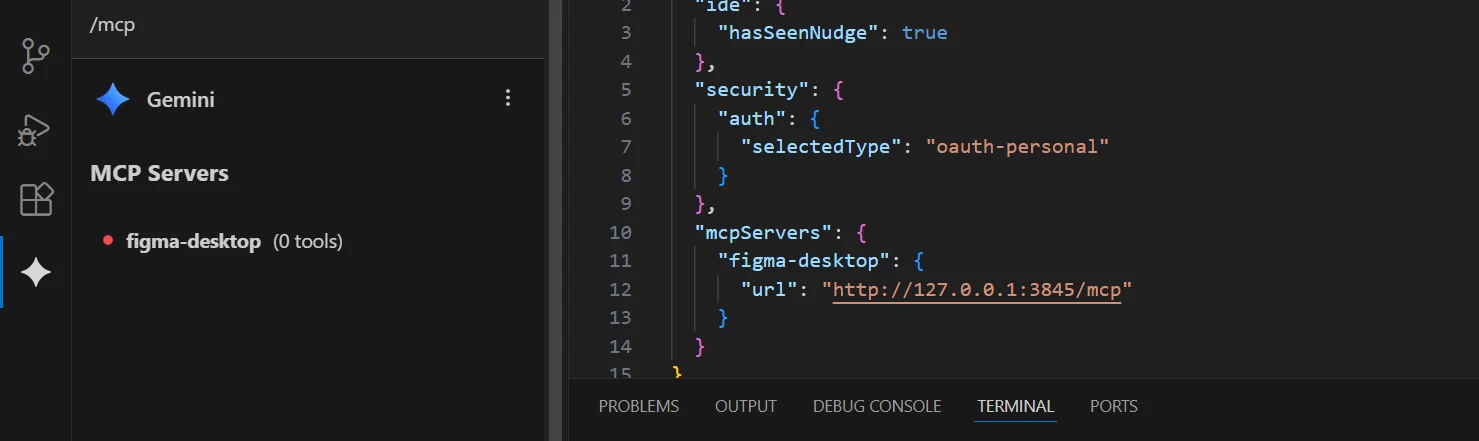


I double-check everything. It was working a few weeks back. I am uncertain whether I overlooked any updates or if there have been any changes in the Figma MCP system.

I would greatly appreciate your guidance.

Regards,
Anand 

1 reply

  • Figmate
  • December 29, 2025

Hi ​@anandpadia25


Based on the screenshot you shared, I can see that the MCP server is listed as “figma-desktop (0 tools)”, and it appears that you’re using the Figma desktop MCP server address (http://127.0.0.1:3845/mcp).
 

I understand you’ve already tried several things, but let’s double-check that the MCP server is properly enabled in the Figma Desktop app. As a quick reminder, the Figma desktop MCP server can only be used with the Figma Desktop app:
 

  1. Open the Figma Desktop app and make sure you’re running the latest version.
  2. Create or open a Figma Design file.
  3. Enable Dev Mode from the toolbar at the bottom (or use Shift + D).
  4. In the Inspect panel, locate the MCP Server section and click “Enable desktop MCP server.”
  5. You should see a confirmation message at the bottom once the server is running.

You can also refer to this guide for detailed steps: How to setup the Figma desktop MCP server


Once you’ve confirmed that the MCP server is properly enabled in the Figma Desktop app, let’s move on to the client side:

  • Are there any updates available for your client?
  • Could you try logging out and back into your client?

If you’re using VS Code, please make sure you’re following the required setup steps outlined here: VS code
 

If the issue continues, please reply with:

  • The results of the steps above
  • Any relevant screenshots or video recordings
  • The URL of the impacted file (please grant view-only access to support-share@figma.com)

With this information, I can create a support ticket on your behalf so our team can investigate further.
If you’d prefer to share details privately, you can also submit a bug report by following this guide: What to share in a bug report to Figma Support 


Thanks,