

Solved

Figma MCP Missing Google Sans Flex

  • July 16, 2026
  • 4 replies
  • 37 views

Chaz_Gatian2

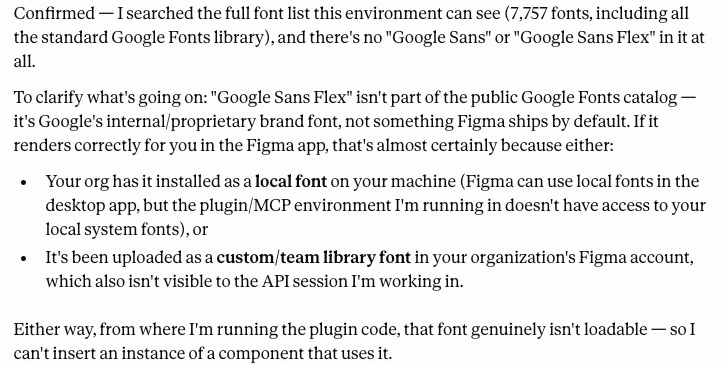
I’m trying to use the Figma MCP to create a Figma design based off our Figma components. When I use the MCP with Claude, Claude is complaining that I need to install Google Sans Flex as a distributed font. However, Google Sans Flex is already included in Figma.

When I installed the font manually as an admin, it ended up causing issues with existing designer’s files. I then uninstalled the font, but then it continued to break other designer files.


Claude’s output when attempting to use Figma MCP to create a design: 
 

Best answer by adamsmasher

Ok, thanks for confirming. Can you also check and make sure the plugin for Claude is up-to-date? In the Claude Desktop app, go to Settings > Plugins, click on the Gear icon for the Figma plugin, then click the Update button at the top if it isn’t disabled. I’m also wondering what would happen if you start a fresh chat with Claude, ask it to pull in designs that you know are using Google Sans Flex, then have it insert an instance of the component.

4 replies

adamsmasher
Figmate
  • Figmate
  • July 16, 2026

Hi, ​@Chaz_Gatian2, Thanks for your post! I can see why this is confusing, especially since Claude is even saying the font isn’t part of the public catalogue (even though you can find it here).


Are you using the local MCP server or the remote server? I’m not sure if it will make a difference, but it’s worth knowing as that can sometimes affect things. Just to quadruple check, I opened up one of my own test files and found Google Sans Flex as a font choice.


Have you considered using an AI agent within Figma Design itself to do this? I know this isn’t finding out the cause, but it would work to unblock you in the meantime. While we are within the beta period it does not use credits, so you don’t need to worry about the impact on your overall credit usage at the moment.


Chaz_Gatian2
  • Author
  • New Member
  • July 21, 2026

I’m using the remote MCP server with Claude desktop. I dont want to use Figma Design.


adamsmasher
Figmate
  • Figmate
  • Answer
  • July 24, 2026

Ok, thanks for confirming. Can you also check and make sure the plugin for Claude is up-to-date? In the Claude Desktop app, go to Settings > Plugins, click on the Gear icon for the Figma plugin, then click the Update button at the top if it isn’t disabled. I’m also wondering what would happen if you start a fresh chat with Claude, ask it to pull in designs that you know are using Google Sans Flex, then have it insert an instance of the component.


Chaz_Gatian2
  • Author
  • New Member
  • July 27, 2026

@adamsmasher I think this is working properly now. I didn’t need to update the Figma Plugin (I only use the Figma MCP). But it looks like it’s no longer complaining.
