ShaneHCisco
New Participant
October 16, 2026
Solved

Figma Make Template Publish UI Confusion

Hi team,

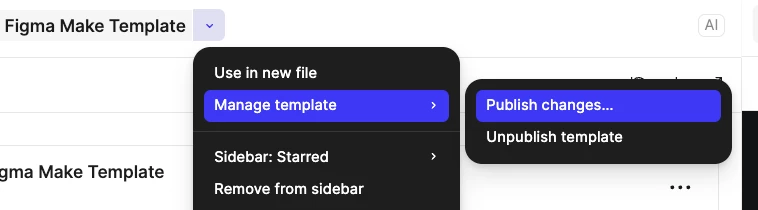
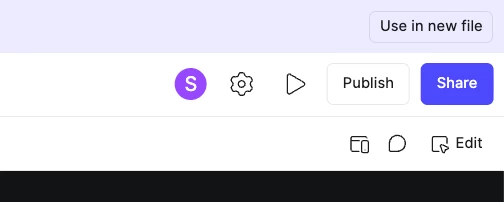
When working Figma Make templates it is not intuitive that there are two publish paths. My hunch is one is “publish to community”:


and one is “publish to other people who can edit/view the un-community-published pending version” (I think):


adamsmasher
adamsmasherSolution
Figmate
October 17, 2026

Hey, ​@ShaneHCisco! Thanks for your post and feedback - I can understand why this would be confusing for you when working on a Figma Make template. 


By “un-community-published pending version”, you mean a website/app created in Figma Make, right? You are correct about the Publish button seen to the top right. That button will publish the Figma Make file as live website.


The other publish option found in the file name dropdown menu under Manage template will publish the Figma Make template - it’s a bit like publishing a library with a Figma Design file, although this is just updating the template rather than propagating to other Figma Make files that have used the template.


You can also find related options by clicking the Share button, then Publish template. There’s also a Publish to Community option. The difference between those is audience. The former is limited to team mates and people you share the template with, and the latter publishes it the community for everyone.


1 reply

adamsmasher
Figmate
adamsmasherSolution
Figmate
October 17, 2026

Hey, ​@ShaneHCisco! Thanks for your post and feedback - I can understand why this would be confusing for you when working on a Figma Make template. 


By “un-community-published pending version”, you mean a website/app created in Figma Make, right? You are correct about the Publish button seen to the top right. That button will publish the Figma Make file as live website.


The other publish option found in the file name dropdown menu under Manage template will publish the Figma Make template - it’s a bit like publishing a library with a Figma Design file, although this is just updating the template rather than propagating to other Figma Make files that have used the template.


You can also find related options by clicking the Share button, then Publish template. There’s also a Publish to Community option. The difference between those is audience. The former is limited to team mates and people you share the template with, and the latter publishes it the community for everyone.