Hi I have a prototype on Figma Make that won’t load and seems stuck in “Reasoning” without loading anything. It doesn’t work on the browser either, or when published. I’ve tried the following without success:
Reloading
Quitting the app and loading again
Duplicating the file
Restoring an older version
All of this while still consuming credits, which makes it extra frustrating. Appreciate any help I can get.
Hey again @ClaudiaM , thanks for following up, and we apologize for the delay.
I checked internally and can confirm your case is still open and has already been escalated. I've added a follow-up note internally to make sure it gets picked back up as soon as possible.
There's no need to submit another request in the meantime, please continue through your existing support case, and the team will follow up with you directly there. Thanks for your patience while this gets sorted out!
Update: Glad to see in the backend that it’s working again now. For visibility here, in case other may run unto similar issues, the steps to resolve this issue was to rename the App file, then prompt Make to fix the empty file.
Your App.tsx file is currently named App-2.tsx. This can sometimes happen automatically and doesn’t always cause an issue, but in this case, I can also see that the file is empty, which is why nothing is rendering on the canvas.
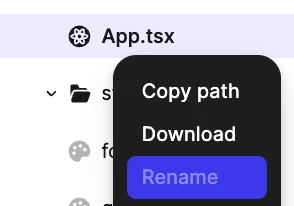
As a first step, please rename App-2.tsx to App.tsx. You can do this from the code files by right-clicking the file and renaming it.
I’ll go ahead and close the topic here, thank you!
Hey there! Celine from the Community Support team at Figma here. Sorry for the disruption into your work!
Since you've already tried reloading, restarting the app, duplicating the file, restoring an older version, and confirmed the same behavior in both the desktop app and browser, I'd like our Technical Quality team to take a closer look.
I've gone ahead and created a support ticket on your behalf. To help with the investigation, please reply directly to the support email with:
The URL of the affected Make file.
A screen recording showing it getting stuck on "Reasoning."
Whether this happens with just this file or with other Make files as well.
Your operating system and whether you're using the browser or desktop app (including the version).
Our team will investigate and reach out if they need any additional information. For reference, your support case is #2042773, sent to your email address: cxxxa.mxxxy@oxxxs.xo, thanks for your patience!
Hey again @ClaudiaM , thanks for following up, and we apologize for the delay.
I checked internally and can confirm your case is still open and has already been escalated. I've added a follow-up note internally to make sure it gets picked back up as soon as possible.
There's no need to submit another request in the meantime, please continue through your existing support case, and the team will follow up with you directly there. Thanks for your patience while this gets sorted out!
Update: Glad to see in the backend that it’s working again now. For visibility here, in case other may run unto similar issues, the steps to resolve this issue was to rename the App file, then prompt Make to fix the empty file.
Your App.tsx file is currently named App-2.tsx. This can sometimes happen automatically and doesn’t always cause an issue, but in this case, I can also see that the file is empty, which is why nothing is rendering on the canvas.
As a first step, please rename App-2.tsx to App.tsx. You can do this from the code files by right-clicking the file and renaming it.
I’ll go ahead and close the topic here, thank you!