Figma Make: Prompt composer layout breaks when selecting models with longer names
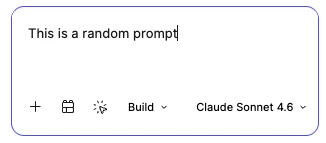
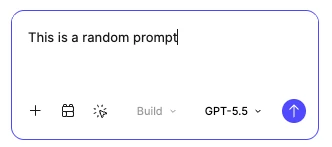
In Figma Make, selecting a model with a longer display name (for example, Claude Sonnet 4.6) causes the prompt composer layout to break. The send/submit button is pushed outside of the prompt input area. Switching back to a model with a shorter name (such as GPT-5.5) restores the layout.
Steps to reproduce
- Open Figma Make.
- Open the prompt composer.
- Select a model with a longer display name (e.g. Claude Sonnet 4.6).
- Observe the bottom toolbar.
Expected behavior
- The prompt composer should maintain its layout regardless of the selected model.
- The model selector should truncate or resize if necessary.
- The send button should remain anchored within the composer.
Actual behavior
- The longer model name expands the toolbar.
- The send button shifts outside the prompt composer.
- Returning to a shorter model name restores the correct layout.
Environment
- Product: Figma Make
- Platform: macOS (Desktop App)