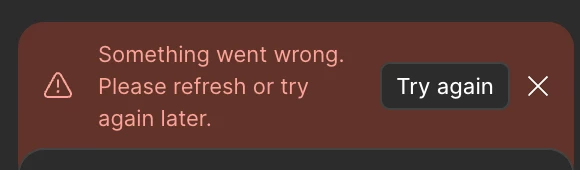
Hey @Artiukhova, Daria, thanks for flagging this! I understand you're experiencing issues with Figma Make and getting an error messages. Let me help you troubleshoot this.
As our first step can you try duplicating your Figma Make file and starting fresh with the prompts in the copy and see if you run into the same error?
If these steps don't resolve the issue, it could be related to rate limits or connection issues. Sometimes when using AI tools extensively, you may need to wait a bit before trying again due to rate limiting.
Could you let me know if:
Are you experiencing this issue in both the browser and desktop app?
Does the problem persist across different internet connections?
Hi @Artiukhova, Daria, I’ve got updates! We’ve had a few other reports of the same issue, and our engineering team has already rolled out a fix.
Everything should now be back to normal. If you’re still experiencing the problem, could you share a bit more detail so we can look into it right away? For example:
What exactly were you doing right before the error appeared?
How many prompts were you trying to submit?
What kind of prompts were they?
Were they short, long, or packed with lots of information?
Your input will really help us pinpoint what’s going on.
I’m having the same issue and have tried all of the listed remedies.
I received this on multiple types of prompts, from a single sentence command to “Change a background color” to a specific color, to stacked multi-sentence promps. They started after the 78th prompt in a file. And the error is now happening on multiple files, old and new. It’s rendered Make unusable for now.
I’ve also waited an hour to try again and the error still persists. The error is within Figma itself and not browser based. I haven’t tried it there yet. This has also been on a single internet connection (at work)
Hi @Jeff Barker, thank you for the detailed info!
I’ve already flagged this internally with our team, and in order for us to dig in further, we’ll need a file URL to investigate. Could you please share a direct link to one of the affected files and invite support-share@figma.com with “can edit” permissions? Just to note, adding a @figma.com email won’t affect your billing.
If you’d prefer not to post the link publicly, feel free to DM me and let me know under this post.
It looks like after waiting for a day that Make is back to normal. As for the link, I don’t think my companies security settings will allow me to add you to the file. But for now, it looks like the wait has fixed it. Hopefully you guys will have a more permanent fix in the near future. Thank you for the prompt response also! That’s much appreciated!
Hey @Jeff Barker, thank you so much for the update! I’m really glad to hear it’s working again for you.
For anyone else who might come across this thread and run into the same issue, the team let me know that they’ll need some extra details to properly investigate. If you’re seeing this error, it helps a lot to share:
The URL link to the file where the issue occurred (if you’re able to share it)
What you were doing right before the error appeared
How many prompts you tried to submit
The type of prompts (short, long, or packed with lots of info)
The more context the team has, the faster they can investigate. Thank you for your help!
Hi I’m having the same issue across all files on browser and app. We tried same files with another user from the company and it worked for him. I went to his computer and logged in and it didn’t work for me. So is my account blocked for some reason or the unlimited Figma Make is actually limited?
Hi @DeDes, thanks for sharing the details of what you’ve tried!
Looking at your account, I can see that you’re on the Professional plan. That plan includes 3,000 AI credits per month (which usually covers about 50–70 Make prompts). If you’ve already reached that limit, that may be why you’re seeing the error. That said, I’d recommend double-checking with our Support team just to be sure nothing else is going on with your account. You can reach them directly through this form.