
Figma Make looses connection mid task

  • June 21, 2026
  • 1 reply
  • 20 views

abidabid

Figma Make looses connection during a prompt with “Cannot connect, check your internet try again”. 
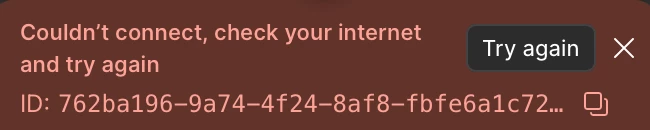
Super annoying! Counts towards my credits as well!

Error ID: 762ba196-9a74-4f24-8af8-fbfe6a1c7290

June 21, 2026

Hey ​@abidabid, welcome to Figma Forum and thanks for flagging this!

To help narrow down the connection issue, can you confirm a few things?

  1. Network: Any difference if you connect via a different network (mobile hotspot, different wifi)?
  2. Scope: Does this happen across all files and file types, or only in Figma Make?
  3. Platform: Is this happening in a browser, the Figma Desktop App, or both?
  4. App version: If you're on desktop, can you check you're on the latest version (Figma menu → Check for Updates) and that your OS is up to date?

For more on what specific error messages mean and how to resolve them, here's the troubleshooting guide: Troubleshoot in Figma Make → Error messages.

I'll keep an eye out for your reply.

1 reply

Tom Reem
Figmate
  • Figmate
  • June 21, 2026

Hey ​@abidabid, welcome to Figma Forum and thanks for flagging this!

To help narrow down the connection issue, can you confirm a few things?

  1. Network: Any difference if you connect via a different network (mobile hotspot, different wifi)?
  2. Scope: Does this happen across all files and file types, or only in Figma Make?
  3. Platform: Is this happening in a browser, the Figma Desktop App, or both?
  4. App version: If you're on desktop, can you check you're on the latest version (Figma menu → Check for Updates) and that your OS is up to date?

For more on what specific error messages mean and how to resolve them, here's the troubleshooting guide: Troubleshoot in Figma Make → Error messages.

I'll keep an eye out for your reply.