m1n3g
New Participant
September 23, 2026
Question

Figma Make file upgrade fails with “We couldn’t update your file”

  • September 23, 2026
  • 3 replies
  • 61 views

I’m trying to upgrade an older Figma Make file to the new Make file foundation by following Figma’s official guide: https://help.figma.com/hc/en-us/articles/43572389630103-Upgrade-your-Figma-Make-files
 

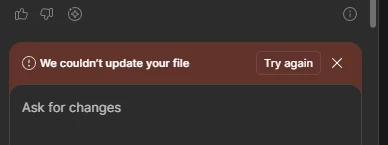
In my case, the upgrade does not complete successfully. It takes around one minute before showing the message “We couldn’t update your file.” I have tried multiple times, but the same error keeps occurring.

My current environment is Windows 11 with the latest version of Figma. I also tried upgrading the file on another device running macOS, using a different network, but the upgrade still failed.

For additional context, this Figma Make file was created in December 2025. I have another Figma Make file that was created around the same time, and it is experiencing the same upgrade issue.

In this situation, is there any way to force the file upgrade or resolve the issue? I also understand that these files may no longer be eligible for upgrade after October if they are not upgraded beforehand.

I am currently waiting for the Figma Support team to assist me with creating a support ticket. Once the ticket is created, I can share both affected Figma Make files with them for further investigation.


VIdeo: https://drive.google.com/file/d/1uzGozyMkuuMS2w5DRBWDRKkqZ6O8192C/view?usp=sharing


3 replies

Donkt
Figmate
Figmate
September 24, 2026

Hi ​@m1n3g 

Don’t worry, your files won’t become ineligible in October. The upgrade becomes required at that point to keep editing, but your content and version history carry over regardless. There is no risk of losing your work here.

Just to make sure we've tried everything first, could you duplicate the Figma Make file and try updating the copied file?

If this doesn't resolve the issue, please share the file URL with me via private message. Then, I’ll create a support ticket so our team can investigate further and assist you directly.

m1n3g
m1n3gAuthor
New Participant
September 25, 2026

Hi ​@Donkt , thanks for the clarification and your reply.

I tried your suggestion by duplicating the affected Figma Make file and running the update on the duplicated copy. Unfortunately, the update failed again in the same way. I didn’t record that attempt, but the result was the same as in the video I shared in my original post.

There is one additional issue now: when I checked the file again the following day, the Update banner/button was no longer showing, so I’m currently unable to retry the upgrade or record another attempt.

I understand from the Help Center that if the Update button is not shown, the file would normally already be using the new foundation. However, the affected file still appears different from a newly created Figma Make file.

I’ve attached screenshots for comparison:

  • Top image: My existing affected Figma Make file — the newer controls are still missing.

  • Bottom image: A newly created Figma Make file — the newer controls/features are visible in the top-right area, such as Draw on preview and Annotate for agent.

Because of this, I’m not sure whether the file was partially upgraded, whether its upgrade status has become stuck, or whether the missing Update button is another issue.

I’ll send you the URL of the affected file via private message as requested.

Thank you!


Donkt
Figmate
Figmate
September 25, 2026

Hi again ​@m1n3g.

Thank you for sending through your DM and providing us with all of this information.

We’ve opened a support ticket for this. The ID is #2153638 and the email subject line is Figma Make file upgrade fails with “We couldn’t update your file”. Please keep an eye on your email (and spam folder if necessary) for the email and any replies from our team.