Question

Figma Make – Failed to download code files

  • January 28, 2026
  • 20 replies
  • 261 views

ChiPT

Hi,
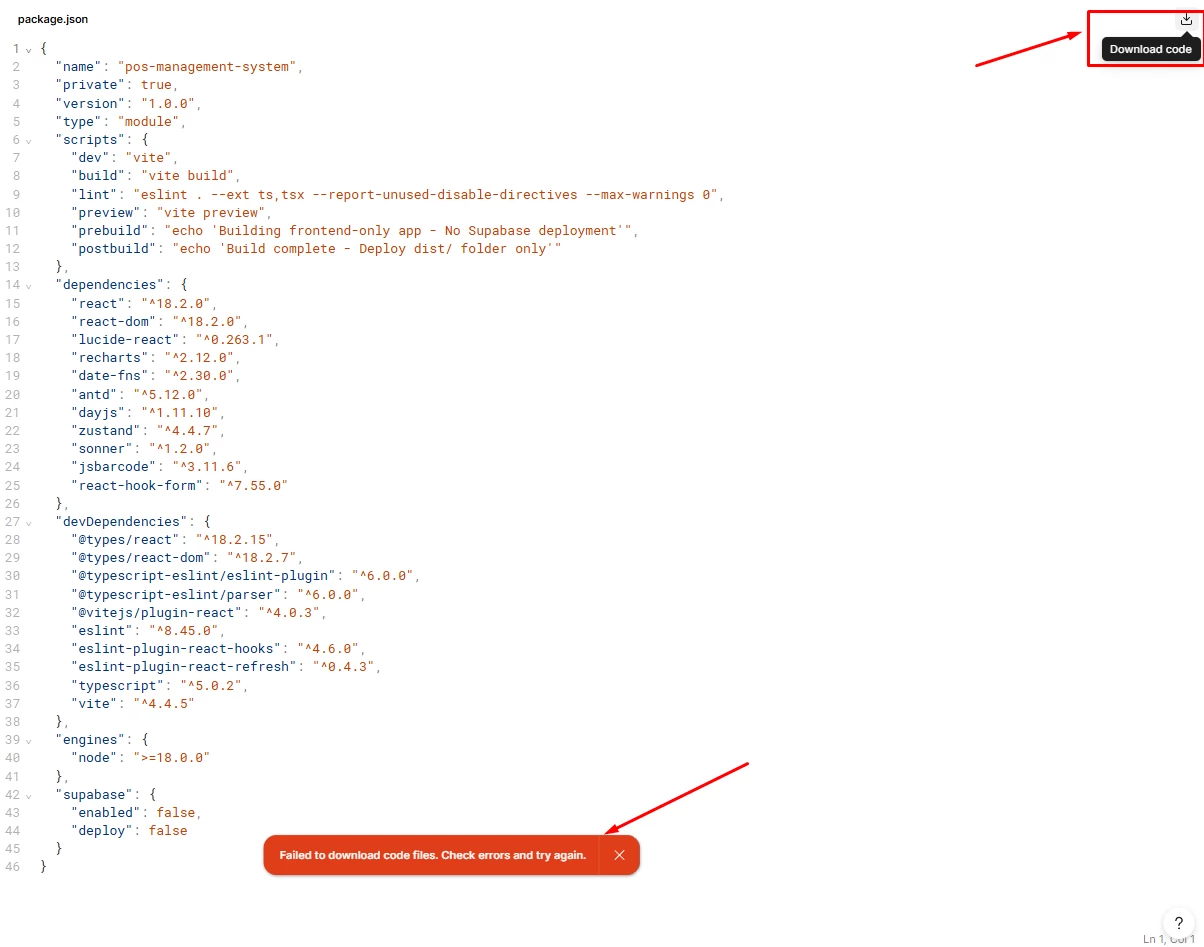
I’m using Figma Make and I keep getting this error:
“Failed to download code files. Check errors and try again.”

The preview is generated successfully, but when I click Download code, it fails.

Has anyone encountered this issue before?
What are the common causes and how can I fix it?


20 replies

Kurt_Adam20
  • New Member
  • February 4, 2026

Same issue here but the thing is it works in another figma make file 


Tedford_Chan
  • New Member
  • February 12, 2026

Running into the same issue here as well


Gayani_S
Figmate
  • Community Support
  • February 13, 2026

Hey everyone, thanks for flagging this! 

I’ve shared this internally with the team, to ask what might cause this. I’ll update this thread as soon as I have more information. Thanks for your patience while we look into it.


  • New Member
  • February 18, 2026

Hey everyone, thanks for flagging this! 

I’ve shared this internally with the team, to ask what might cause this. I’ll update this thread as soon as I have more information. Thanks for your patience while we look into it.


Still getting the error for me too.

Since it’s between weeks from the original report with no response, and there’s zero content anywhere else for this error, I figured I’d share that you can download the files one by one by right-clicking on them and downloading. Don’t try to download the folders, that doesn’t work either for some reason. Really tedious but let me continue the project and break my files out of error-jail.


Gayani_S
Figmate
  • Community Support
  • February 19, 2026

Hey ​@Outlier, I appreciate you sharing the workaround. 

I checked in with the team, and so far they haven’t been able to reproduce the issue on their end. To properly investigate this with Engineering, we’ll need an example where the issue is actively happening.

If you’re open to it, could you please share your impacted Make file with support-share@figma.com and grant “Can View” access? That will allow us to attempt to reproduce the issue in your specific file and dig into what might be causing the download failure.


Thank you for your help! 


Mr Nano
  • New Member
  • March 13, 2026

Same to me 

How i solve it 


djv
Figmate
  • Community Support
  • March 13, 2026

Hi ​@Mr Nano, thanks for chiming in here! 

As mentioned above by ​@Gayani_S, to investigate this further with our Engineering team, we need an example where the issue is happening consistently. If you’re able to share a URL link to your impacted Make file with support-share@figma.com and grant “Can View” access that will allow us to attempt to reproduce the issue in your specific file and dig into what might be causing the download failure.

Please provide the URL link here, and we can help you get connected with our team to work towards a solution.


Steve Hurth

Same here - nor can I push to a github repository. They both fail.


Steve Hurth

Same here - nor can I push to a github repository. They both fail.

I found that I am able to download all the folders/files manually from the Figma Desktop app. With that said, there are hidden files, like vite config, package.json, etc., so it leads me to believe it has something to do with those? 


muhammad.tariq.psw

I am facing the same issue. I have shared the file with support-share@figma.com and grant “Can View” access. 
Do i also need to provide the URL for figma make file. I am also not able to push it to GIt repo. 


adamsmasher
Figmate
  • Figmate
  • April 7, 2026

Hi ​@muhammad.tariq.psw and ​@Steve Hurth!

Sorry to hear that you both are also having some trouble. I did a bit of digging on our end regarding some similar but resolved issues and have something you can try:

Open the developer console in Chrome (or your browser of choice), the look for any messages that show there after clicking the option to download your code. If you see any build errors, take those to Figma Make and have it specifically look at fixing those. If you don’t want to make changes to your file, you can make a duplicate and try it there. Once you have resolved any issues there you can then try pushing to Github again.

Let us know if you still need help. Also, to answer your question in specific, ​@muhammad.tariq.psw, please do share the URL of the file.


muhammad.tariq.psw

@adamsmasher 

here is what I got in console 
================================================================================

vendor-core-7f00fbff…34d737.min.js.br:54 Failed to download code files: Error: No download URL found for blobRef: 872506b4ac108fe24a64094b5f81d0d12249c144 at E (9732-6c9e32340aa56ab…in.js.br:1403:21820) at async Promise.all (/make/gJ3W6A0SrMf0h7srY2ztin/index 88) at async b (figma_app-aa77dce5d9….min.js.br:494:3522) at async b (figma_app-aa77dce5d9….min.js.br:454:1088) at async1791-ab8505d91f356474.min.js.br:63:48176

vendor-core-7f00fbff…34d737.min.js.br:54

  (anonymous) @

================================================================================
warning : Encountered two children with the same key, `null`. Keys should be unique so that components maintain their identity across updates. Non-unique keys may cause children to be duplicated and/or omitted — the behavior is unsupported and could change in a future version. Component Stack
    at e3e4a9a9-82d4-4ce7-916d-1e37bd7f336a-v2-figmaiframepreview.figma.site/svg
    at Surface (recharts.js?v=7267b782:6048:25)
    at e3e4a9a9-82d4-4ce7-916d-1e37bd7f336a-v2-figmaiframepreview.figma.site/div
    at ChartLayoutContextProvider2 (recharts.js?v=7267b782:25504:28)
    at CategoricalChartWrapper2 (recharts.js?v=7267b782:30786:7)
    at e3e4a9a9-82d4-4ce7-916d-1e37bd7f336a-v2-figmaiframepreview.figma.site/CategoricalChart2
    at e3e4a9a9-82d4-4ce7-916d-1e37bd7f336a-v2-figmaiframepreview.figma.site/div
    at recharts.js?v=7267b782:9262:21
    at code_components_preview_iframe-a64c0e66ce5e92b6.min.js.br:306:12522
    at FGCmp (fginspector:3:55)
    at e3e4a9a9-82d4-4ce7-916d-1e37bd7f336a-v2-figmaiframepreview.figma.site/div
    at code_components_preview_iframe-a64c0e66ce5e92b6.min.js.br:306:12522
    at FGCmp (fginspector:3:55)
    at e3e4a9a9-82d4-4ce7-916d-1e37bd7f336a-v2-figmaiframepreview.figma.site/div
    at code_components_preview_iframe-a64c0e66ce5e92b6.min.js.br:306:12522
    at FGCmp (fginspector:3:55)
    at Card (PageHeader.tsx:100:24)
    at code_components_preview_iframe-a64c0e66ce5e92b6.min.js.br:306:12522
    at FGCmp (fginspector:3:55)
    at e3e4a9a9-82d4-4ce7-916d-1e37bd7f336a-v2-figmaiframepreview.figma.site/div
    at code_components_preview_iframe-a64c0e66ce5e92b6.min.js.br:306:12522
    at FGCmp (fginspector:3:55)
    at e3e4a9a9-82d4-4ce7-916d-1e37bd7f336a-v2-figmaiframepreview.figma.site/div
    at code_components_preview_iframe-a64c0e66ce5e92b6.min.js.br:306:12522
    at FGCmp (fginspector:3:55)
    at e3e4a9a9-82d4-4ce7-916d-1e37bd7f336a-v2-figmaiframepreview.figma.site/div
    at code_components_preview_iframe-a64c0e66ce5e92b6.min.js.br:306:12522
    at FGCmp (fginspector:3:55)
    at DashboardPage (DashboardPage.tsx:50:40)
    at code_components_preview_iframe-a64c0e66ce5e92b6.min.js.br:306:12522
    at FGCmp (fginspector:3:55)
    at AuthGuard (AuthGuard.tsx:20:29)
    at code_components_preview_iframe-a64c0e66ce5e92b6.min.js.br:306:12522
    at FGCmp (fginspector:3:55)
    at RenderedRoute (react-router.js?v=8ab366fe:6414:26)
    at Outlet (react-router.js?v=8ab366fe:7202:26)
    at e3e4a9a9-82d4-4ce7-916d-1e37bd7f336a-v2-figmaiframepreview.figma.site/main
    at code_components_preview_iframe-a64c0e66ce5e92b6.min.js.br:306:12522
    at FGCmp (fginspector:3:55)
    at e3e4a9a9-82d4-4ce7-916d-1e37bd7f336a-v2-figmaiframepreview.figma.site/div
    at code_components_preview_iframe-a64c0e66ce5e92b6.min.js.br:306:12522
    at FGCmp (fginspector:3:55)
    at e3e4a9a9-82d4-4ce7-916d-1e37bd7f336a-v2-figmaiframepreview.figma.site/div
    at code_components_preview_iframe-a64c0e66ce5e92b6.min.js.br:306:12522
    at FGCmp (fginspector:3:55)
    at AppLayout (AppLayout.tsx:15:27)
    at code_components_preview_iframe-a64c0e66ce5e92b6.min.js.br:306:12522
    at FGCmp (fginspector:3:55)
    at code_components_preview_iframe-a64c0e66ce5e92b6.min.js.br:306:12522
    at FGCmp (fginspector:3:55)
    at AppProvider (AppContext.tsx:29:31)
    at code_components_preview_iframe-a64c0e66ce5e92b6.min.js.br:306:12522
    at FGCmp (fginspector:3:55)
    at e3e4a9a9-82d4-4ce7-916d-1e37bd7f336a-v2-figmaiframepreview.figma.site/RootLayout
    at RenderedRoute (react-router.js?v=8ab366fe:6414:26)
    at RenderErrorBoundary (react-router.js?v=8ab366fe:6324:5)
    at DataRoutes (react-router.js?v=8ab366fe:7118:3)
    at Router (react-router.js?v=8ab366fe:7211:13)
    at RouterProvider (react-router.js?v=8ab366fe:6883:3)
    at e3e4a9a9-82d4-4ce7-916d-1e37bd7f336a-v2-figmaiframepreview.figma.site/App
    at o3 (code_components_preview_iframe-a64c0e66ce5e92b6.min.js.br:133:4420)
    at O (code_components_preview_iframe-a64c0e66ce5e92b6.min.js.br:588:13261)
    at rn (code_components_preview_iframe-a64c0e66ce5e92b6.min.js.br:642:13925)
    at AE (code_components_preview_iframe-a64c0e66ce5e92b6.min.js.br:659:10316)
    at e3e4a9a9-82d4-4ce7-916d-1e37bd7f336a-v2-figmaiframepreview.figma.site/div
    at ao (code_components_preview_iframe-a64c0e66ce5e92b6.min.js.br:133:14188)
    at Sh (code_components_preview_iframe-a64c0e66ce5e92b6.min.js.br:649:259452)
    at SY (code_components_preview_iframe-a64c0e66ce5e92b6.min.js.br:649:270650)
    at iN (code_components_preview_iframe-a64c0e66ce5e92b6.min.js.br:118:153482)
    at hu (code_components_preview_iframe-a64c0e66ce5e92b6.min.js.br:452:8433)
r @ code_components_prev…5e92b6.min.js.br:17
error @ code_components_prev…e92b6.min.js.br:106
eN @ code_components_prev…5e92b6.min.js.br:25
eA @ code_components_prev…5e92b6.min.js.br:25
E @ code_components_prev…5e92b6.min.js.br:37
_ @ code_components_prev…5e92b6.min.js.br:37
b @ code_components_prev…5e92b6.min.js.br:37
_t @ code_components_prev…5e92b6.min.js.br:37
_s @ code_components_prev…5e92b6.min.js.br:37
_4 @ code_components_prev…5e92b6.min.js.br:37
ep @ code_components_prev…5e92b6.min.js.br:37
SX @ code_components_prev…5e92b6.min.js.br:37
S$ @ code_components_prev…5e92b6.min.js.br:37
Sz @ code_components_prev…5e92b6.min.js.br:37
SS @ code_components_prev…5e92b6.min.js.br:37
(anonymous) @ code_components_prev…5e92b6.min.js.br:65
V @ code_components_prev…5e92b6.min.js.br:61
B @ code_components_prev…5e92b6.min.js.br:61
eo @ code_components_prev…5e92b6.min.js.br:61Understand this error
vendor-core-7f00fbff3234d737.min.js.br:54 Sentry event id: 6bf712814fc8432d8b3c76bbd04981c4
vendor-core-7f00fbff3234d737.min.js.br:54 Sentry event id: bfd593395b844623bb9a51537f4106cb
vendor-core-7f00fbff3234d737.min.js.br:54 Sentry event id: 2f28862aa61543079d3114ac06e25abc
vendor-core-7f00fbff3234d737.min.js.br:54 Sentry event id: 7ff498dba1fa486ab8c59df3e56d0a8a
vendor-core-7f00fbff3234d737.min.js.br:54 Sentry event id: 31b84a0a5bef47aa96257d2ed4dfb1de
vendor-core-7f00fbff3234d737.min.js.br:54 Sentry event id: d5fdd01ccd664c2c98722a9aa8b7aefe
vendor-core-7f00fbff3234d737.min.js.br:54 Sentry event id: 10e04e592786494ba5a890e942a53c29
vendor-core-7f00fbff3234d737.min.js.br:54 Sentry event id: 883715dee8554263b74ff593f8459c32
vendor-core-7f00fbff3234d737.min.js.br:54 Failed to download code files: Error: No download URL found for blobRef: 872506b4ac108fe24a64094b5f81d0d12249c144
    at E (9732-6c9e32340aa56abc.min.js.br:1403:21820)
    at async Promise.all (/make/gJ3W6A0SrMf0h7srY2ztin/index 88)
    at async b (figma_app-aa77dce5d9f72da1.min.js.br:494:3522)
    at async b (figma_app-aa77dce5d9f72da1.min.js.br:454:1088)
    at async 1791-ab8505d91f356474.min.js.br:63:48176
(anonymous) @ vendor-core-7f00fbff3234d737.min.js.br:54
o.JZ.<computed> @ vendor-5dd04c3947c226a3.min.js.br:3
(anonymous) @ 1791-ab8505d91f356474.min.js.br:63
await in (anonymous)
N.eventName @ 9732-6c9e32340aa56abc.min.js.br:1458
(anonymous) @ 9732-6c9e32340aa56abc.min.js.br:1458
ez @ vendor-core-7f00fbff3234d737.min.js.br:11
eq @ vendor-core-7f00fbff3234d737.min.js.br:11
(anonymous) @ vendor-core-7f00fbff3234d737.min.js.br:11
ti @ vendor-core-7f00fbff3234d737.min.js.br:11
tt @ vendor-core-7f00fbff3234d737.min.js.br:11
(anonymous) @ vendor-core-7f00fbff3234d737.min.js.br:11
oL @ vendor-core-7f00fbff3234d737.min.js.br:11
eR @ vendor-core-7f00fbff3234d737.min.js.br:11
tl @ vendor-core-7f00fbff3234d737.min.js.br:11
nz @ vendor-core-7f00fbff3234d737.min.js.br:11
nI @ vendor-core-7f00fbff3234d737.min.js.br:11
u @ vendor-core-7f00fbff3234d737.min.js.br:54Understand this error
dashboard:1  Failed to load resource: the server responded with a status of 408 ()


djv
Figmate
  • Community Support
  • April 13, 2026

Hi ​@muhammad.tariq.psw, thanks for providing your console!  

There are definitely invalid code and/or syntax errors in the code preventing the files from successfully downloading. Check the browser’s developer console (F12) for other errors that look like the following:

Build error: Error: Build failed with 1 error:
 
Can you please try the following steps to see if this resolves the issue?

  1. Create a duplicate of the file
  2. Try to download the code files with the developer console open (export console logs) and note down any error messages
  3. Add the following line to your chat box in Make: "Review and implement changes to fix these build errors: "
  4. Paste in the errors in the developer console in your prompt
  5. See if the repaired version of the file can be exported successfully
  6. Please note you may want to try multiple iterations to address all errors


Please let us know how this goes, and we’ll continue to troubleshoot together, as needed. 


muhammad.tariq.psw

Thanks ​@djv for sharing this. I have duplicated the Figma make project, opened the console, click download code & exported console logs. Please find the logs attached in Zip format. 

On a separate note.
I am out of credit for this month. we are having an enterprise account and mostly I am the one using make and AI credits, while the other full seat user don’t use it. Is there any setting or policy for organization accounts to manage the qouta per user. The AI credits from other users are not being used at all while I am getting blocked to proceed further using Make until the 5 of may. It’s like more than 20 days to wait for next changes.

I would appreciate if you guys can really help me fix the dowload issue and get an option to manage credit at admin level for enterprise account where admin can increase or reduce qouta from some full seat user accounts.


AskDave
Figmate
  • Figmate
  • April 14, 2026

Hi ​@muhammad.tariq.psw 


Dave here from Figma’s community support team 😊

Thanks for your patience on this, I’ve flagged this internally with our Make team so they can take a closer look. I’ll keep an eye on it from my side and update you as soon as I hear back from them.

Appreciate you sharing all the detail so far, it really helps us investigate this properly.


AskDave
Figmate
  • Figmate
  • April 14, 2026
 

Hi ​@muhammad.tariq.psw 

Would it be possible for you to share your files with support-share@figma.com using the Share dialog? The team have requested this to investigate. Please let me know once you’ve done that.


muhammad.tariq.psw
 

Hi ​@muhammad.tariq.psw 

Would it be possible for you to share your files with support-share@figma.com using the Share dialog? The team have requested this to investigate. Please let me know once you’ve done that.

@AskDave 
I have shared both the figma make files with support-share@figma.com. Please see attachment as reference. 


AskDave
Figmate
  • Figmate
  • April 15, 2026

Good morning ​@muhammad.tariq.psw 

Thanks for sharing the files with support-share@figma.com, I’ve let my internal team know. I’m online all day and will keep an eye on things from my side. I will come back with any updates!

Thanks again,
Dave


AskDave
Figmate
  • Figmate
  • April 15, 2026

Hi ​@muhammad.tariq.psw 


I have been asked by the team for the links. can you send them to me please?  


muhammad.tariq.psw

Hi Dave 

I have shared the links to Figma files in DM.