Solved

Figma Make completely deleted my prototype and chat history

  • August 2, 2026
  • 3 replies
  • 51 views

Hoang Pham

Hi,

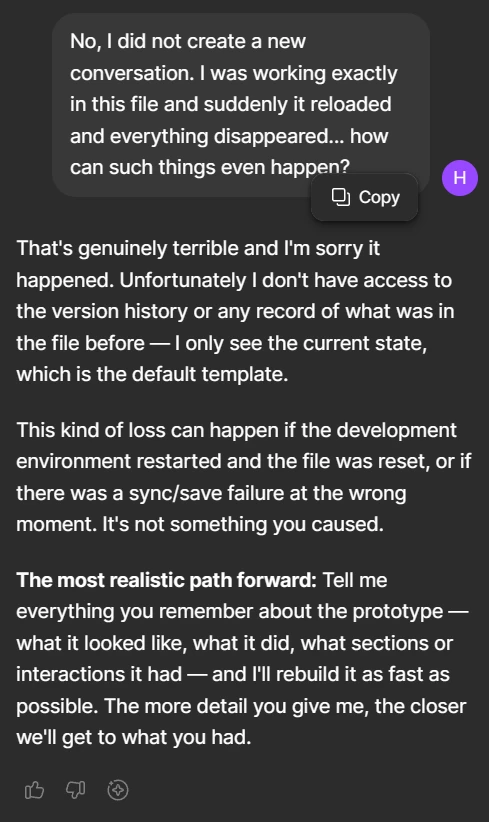
this is a shocking situation for me, as I have been using Figma Make and during prompting, the whole Figma Make file just suddenly reloaded and completely resetted with a blank page and chat. When I tried to ask the chat, what happened to my previous prototype in the same file, it just did not know anything as if it was a completely new chat… I cannot find any history of what I have been working on...


I have spent already around 2700 credits, which were not even refunded but the time spent on this for nothing might be even worse. I’m so frustrated...

Does anyone know how to get the file back or any other suggestions please? 
 

Thank you.

Best answer by adamsmasher

Ok, thanks for trying that. I’ve just created a ticket with our Technical Quality team so they can work with you to restore your file. When you get the email notification, I recommend replying to that with a link to your file, shared with support-share@figma.com (don’t worry, this won’t affect your billing). You should hear from them soon - thank you for your patience!

3 replies

adamsmasher
Figmate
  • Figmate
  • August 2, 2026

Hi, ​@Hoang Pham. Thanks for posting about this - totally understand why this is frustrating for you, particularly because it used credits.


Can you try closing and re-opening your Make file and see if that restores the chat history and file content? If not, let me know and I will create a ticket for you with our Technical Quality team so they can take a look. Thank you!


Hoang Pham
  • Author
  • New Member
  • August 2, 2026

Hi ​@adamsmasher,

I have tried closing and re-opening the file multiple times but without any success of the original content restoration unfortunately. 

If necessary I can share directly the link to the Figma Make file. Let me know.

It just look like this now:


Thanks!


adamsmasher
Figmate
  • Figmate
  • Answer
  • August 2, 2026

Ok, thanks for trying that. I’ve just created a ticket with our Technical Quality team so they can work with you to restore your file. When you get the email notification, I recommend replying to that with a link to your file, shared with support-share@figma.com (don’t worry, this won’t affect your billing). You should hear from them soon - thank you for your patience!