
zone
New Member
Sep 1, 2026 1:25 PM UTC
Solved

Figma Make blocked by network access to figma.site and makeproxy domains

Couldn't load Make. Try checking your network connection or refreshing the page. (M2)
 

Hello Figma Support,

Figma Make was working normally before, but it suddenly stopped working. The issue now occurs on multiple computers, using different internet connections and different VPNs, so it does not appear to be limited to one device, network, proxy, or VPN.

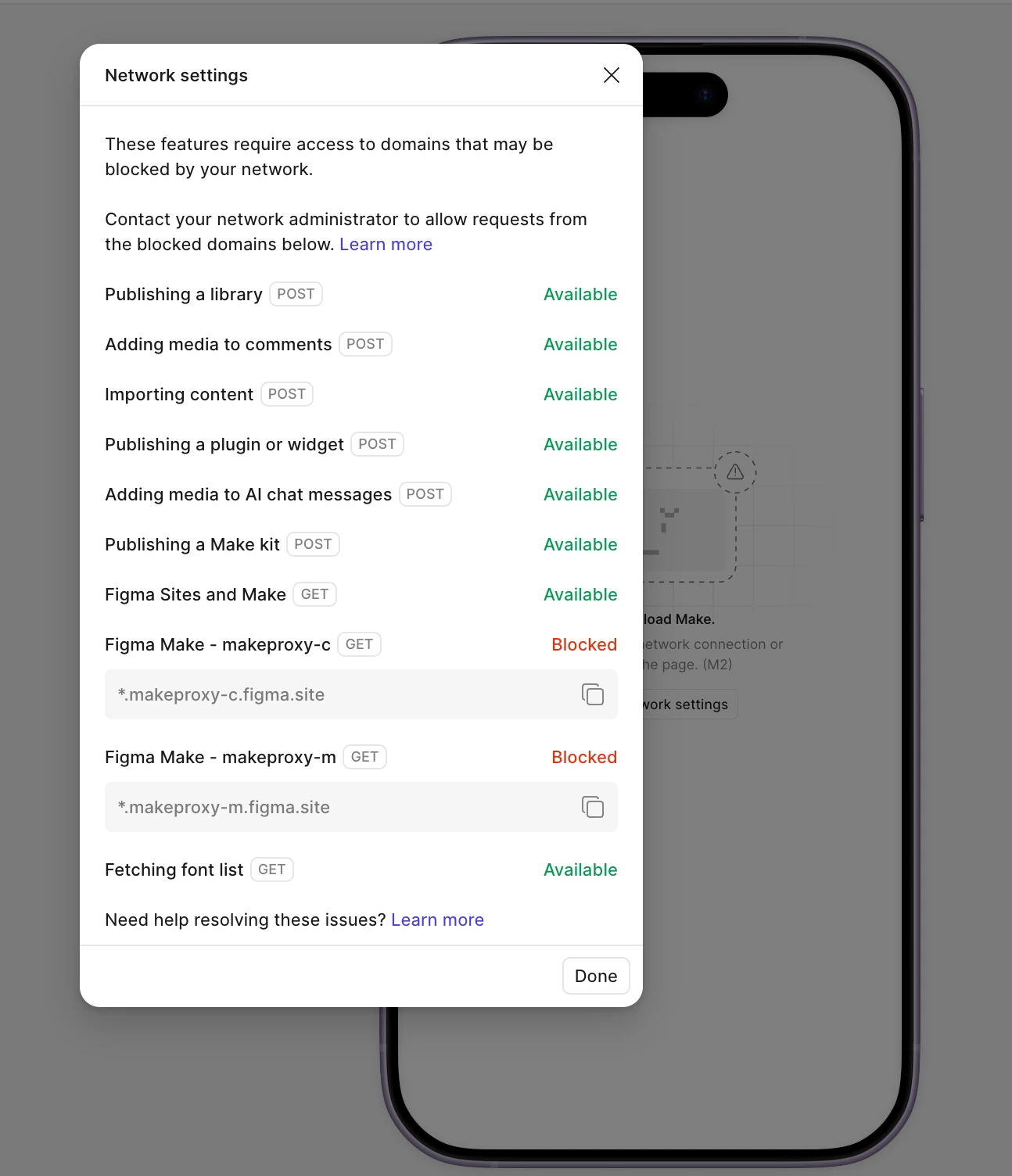
Figma’s Network settings show the following domains as Blocked:

  • *.figma.site
  • *.makeproxy-c.figma.site
  • *.makeproxy-m.figma.site

Other network checks, such as publishing libraries, importing content, adding media, and fetching the font list, are available.

We also tried the DNS solutions suggested in the Figma Community, including adding:

  • 1.1.1.1
  • 8.8.8.8

However, this did not resolve the issue.

Since Figma Make was previously working and the problem affects multiple devices and independent networks, we suspect there may be a service-side, regional, DNS, or domain configuration issue affecting Figma Make.

This issue is seriously affecting our normal teaching activities. We would appreciate your urgent assistance in investigating and resolving it as soon as possible.

Could you please confirm whether:

  1. There is currently an outage or regional access issue affecting Figma Make;
  2. *.figma.site, *.makeproxy-c.figma.site, and *.makeproxy-m.figma.site are currently active and configured correctly;
  3. There are any newly required domains, IP ranges, or WebSocket endpoints;
  4. There is a known issue affecting users in China or users connecting through VPNs.

We can provide screenshots, browser console logs, HAR files, DNS test results, or any other diagnostic information you need.

Thank you for your urgent help.


Celine_
Celine_Solution
Community Support
Sep 1, 2026 3:22 PM UTC

Hey ​@zone, Celine from the Community Support team at Figma here.Thanks for the detailed report and diagnostics here!

I checked internally, and there was a related SEV investigated recently, but it was specific to a DNS provider issue affecting users in India (not a broader outage, and not something affecting users in China specifically)  So this doesn't appear to be a Figma-side or regional outage on our end.

Since *.figma.site, *.makeproxy-c.figma.site, and *.makeproxy-m.figma.site are the domains Figma Make currently relies on, and you're seeing them blocked across multiple independent networks and VPNs, I'd recommend checking with your IT team or ISP to confirm these domains are allowlisted in any firewalls, security software, or network-level filtering — even switching DNS providers (like 1.1.1.1 or 8.8.8.8) won't help if the domains themselves are being blocked further upstream.

If you've confirmed the domains are allowlisted and the issue persists, please submit a bug report through the Support Hub → type "Report a bug, Contact a support specialist" → Click "Start a chat" , select ‘Enter’ then follow the prompts. In the form, please include the diagnostics you mentioned — screenshots, and DNS test results. This will help our team investigate further on their end, thank you!

6 replies

Celine_
Figmate
Celine_Solution
Community Support
Sep 1, 2026 3:22 PM UTC

Hey ​@zone, Celine from the Community Support team at Figma here.Thanks for the detailed report and diagnostics here!

I checked internally, and there was a related SEV investigated recently, but it was specific to a DNS provider issue affecting users in India (not a broader outage, and not something affecting users in China specifically)  So this doesn't appear to be a Figma-side or regional outage on our end.

Since *.figma.site, *.makeproxy-c.figma.site, and *.makeproxy-m.figma.site are the domains Figma Make currently relies on, and you're seeing them blocked across multiple independent networks and VPNs, I'd recommend checking with your IT team or ISP to confirm these domains are allowlisted in any firewalls, security software, or network-level filtering — even switching DNS providers (like 1.1.1.1 or 8.8.8.8) won't help if the domains themselves are being blocked further upstream.

If you've confirmed the domains are allowlisted and the issue persists, please submit a bug report through the Support Hub → type "Report a bug, Contact a support specialist" → Click "Start a chat" , select ‘Enter’ then follow the prompts. In the form, please include the diagnostics you mentioned — screenshots, and DNS test results. This will help our team investigate further on their end, thank you!

Daniel Robins
New Member
Nov 16, 2026 2:23 PM UTC

Hi Figma team, I’m seeing a similar recurring network error in Figma Make. I created and published a prototype on Thursday, 12 November. Both the in-app preview and the published link initially worked, but the in-app preview later stopped loading and showed a network error. Refreshing repeatedly didn’t help.

I tried allowing the Make proxy domains, switching to my phone’s mobile hotspot, and duplicating the file. Each worked temporarily. The duplicate let me edit, publish and open the prototype again, but it’s now failing with the same network error.

I’ve invested significant time and paid Make credits in this prototype, and I’m due to demo it to customers on Tuesday, 24 November. Could someone from Figma Support help investigate what’s causing the recurring failure and suggest a reliable fix or workaround before then?

I’m happy to share the original and duplicate file links, screenshots, and any diagnostic details privately.

Celine_
Figmate
Community Support
Nov 16, 2026 2:48 PM UTC

Hi ​@Daniel Robins , thanks for detailing what you’ve tried and sharing your November 24 demo date!

In the meantime, please review the network checks in my reply above with your IT team or ISP, particularly whether all the listed domains are allowed. I see you’ve already tried allowing the proxy domains, switching networks, and duplicating the file, with only temporary results, so further investigation is needed here.

I’ve created a support ticket on your behalf and include your demo deadline. Please reply directly to the support email with the original and duplicate Make file links, screenshots of the full error, and any diagnostics you’ve collected. (Please keep these details directly in the private support conversation.)

For reference, your case number is: 2265415, sent to your email address: dxxxl.rxxs@rxxxe.ixxo, thank you!


Daniel Robins
New Member
Nov 16, 2026 3:02 PM UTC

Many thanks Celine, I’ll respond over email as requested