

Question

Figma Desktop App Not Opening

  • December 2, 2025
  • 1 reply
  • 15 views

AlexFox

I am working on a Macbook Pro 14 inch running on macOS Tahoe 26.1

When I try to open my Figma desktop app through my doc I get this pop up and the app will not open:
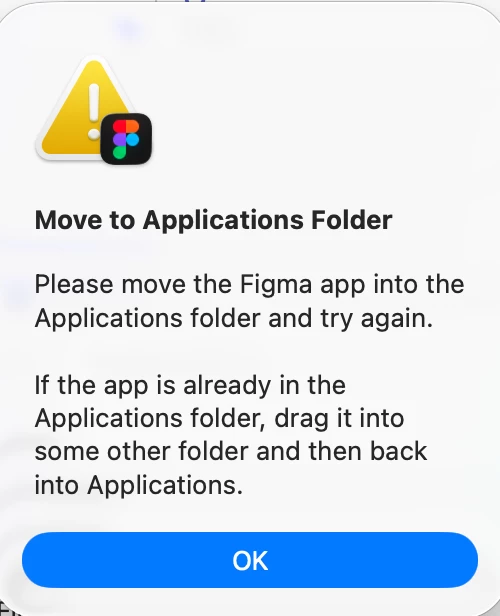

I then try to open the app through my Finder > Applications folder but I get the same error pop up. I am able to access my Figma files through my browser but when I try to open a file through the desktop app nothing happens and this pop up appears again. I uninstalled the desktop app from my computer and reinstalled it which allowed me to open my desktop app, but after closing the desktop app and then trying to open it again this pop up appeared and it seems the only way I am able to get the desktop app running again is to do the uninstall/reinstall method.

1 reply

djv
Figmate
  • Community Support
  • December 2, 2025

Hey ​@AlexFox, thanks for reaching out! 

I definitely understand how frustrating this must be. This actually sounds like more of an issue with your MacBook, rather than Figma. 

Can you please confirm if you’ve tried the solution listed on the screenshot you shared?
 
First, ensure that the Figma desktop app is indeed in your Applications folder.

Using Spotlight search:

  • Press Command + Spacebar to open Spotlight search.
  • Type "Applications" and select the result that appears. 


If you don’t see your Figma desktop app here, drag it from it’s current location (usually the Downloads folder) into the Applications folder. 

But if the Figma desktop app is already in your Applications folder, try dragging it into a different folder then back into your Applications folder. 

If that still doesn’t work, before reinstalling, be sure to delete the application that is already in the Applications folder, then move the new version in. Permissions set on the previous app may be damaged, which is why it is denying you access.

Please let us know how it goes.