

Question

Figma crashing both in laptop app and browser

  • June 15, 2026
  • 1 reply
  • 21 views

StayC

Hi! Sorry to bother you guys. It can crash constantly when I designing and previewing. Just can make whole screen into black or white. Especially when I zooming in or scrolling. Both in laptop application and browser can happen. I don't know if it's my webpage too long or document too big. Sometimes can't crash but can't show the element on that page completely.  Does anybody know how to solve this problem? Thanks a million!!
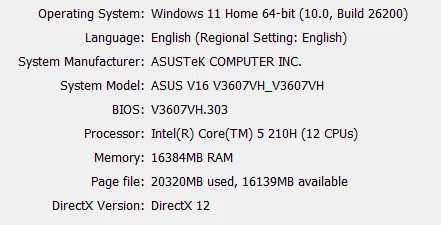
(Picture below is my laptop information, and I use Chrome for browser.)
 

1 reply

Celyn_L
Figmate
  • Figmate
  • June 15, 2026

Hi ​@StayC, Celyn from Figma Community Support here.

Thanks for flagging this and for providing the screenshot. I understand that you’re experiencing crashes while you're designing and previewing your file, particularly when zooming or scrolling, and that you're also seeing issues where some elements don't render completely on certain pages.

I've gone ahead and created a support ticket for you and included all the details you have shared here so the team can take a closer look into this. Your ticket number is #1961674.

It would be really helpful if you could reply directly to the ticket with a link to the impacted file and invite support-share@figma.com with "Can View" access. This won't impact your billing and will allow us to reproduce the issue and investigate further with Engineering.

Please keep an eye on your inbox, someone from the team will be reaching out with next steps shortly.

Thanks for your patience in the meantime! 🙏