

Question

Figma Constantly “Syncing” and Not Saving

  • December 3, 2025
  • 4 replies
  • 38 views

Chela

We’re seeing a recurring issue in Figma where files get stuck in a constant “syncing” state and fail to properly save changes. This creates several workflow blockers:

  • Severe lag while working — interactions become slow or unresponsive during sync.

  • Unable to close the browser tab — Figma prevents closing due to “unsaved changes,” even when everything should be saved.

  • Version history overload — the system generates excessive versions because of the repeated auto-sync attempts, making the file history cluttered and harder to audit.

As a design system designer managing component libraries, this issue becomes especially problematic. It interrupts handoffs, slows down updates to shared components, and increases the chance of file conflicts or outdated states being published. It directly impacts our ability to deliver high-quality, timely component updates.

Requesting investigation into:

  • Why files remain stuck in the syncing state

  • Whether autosave is failing silently

  • How version creation is being triggered

  • Any performance issues affecting large component libraries

This is becoming a blocker for day-to-day design system work.
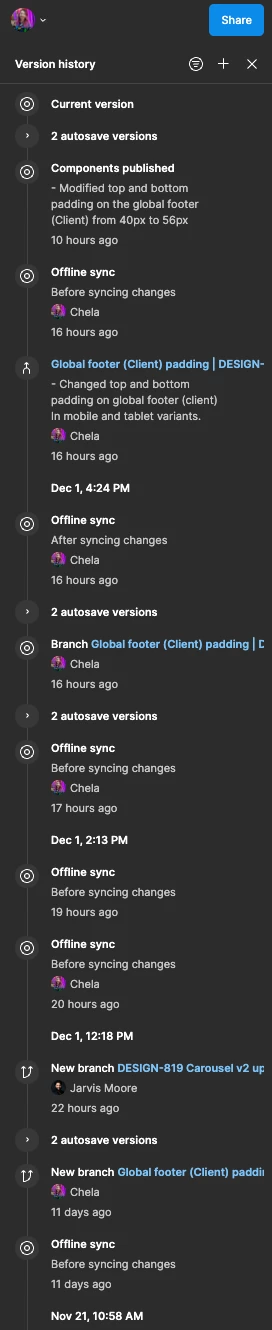


4 replies

Lukáš Kulla
  • New Member
  • December 11, 2025

Hello, I have the same issue with unsaved changes.


I figure out that this issue is affected with editing the same Figma file with another user. When another user is active and editing the file, my file is constantly freezing, lagging and it is impossible to work.


djv
Figmate
  • Community Support
  • December 22, 2025

Hi All, thanks for reaching out and apologies for the delayed reply! 

May I ask if this is happening for all your files or one file in particular?

As ​@Lukáš Kulla mentioned, is this only happening in files with multiple users editing the same file? And if so, is the unsaved changes happening for all users in the same file? Lastly, do you see an icon in the upper-right corner indicating saving issues, and if you do, what text is shown when hovering over the icon? 


With these details, we can work together to try and pinpoint the issue. 


Lukáš Kulla
  • New Member
  • December 23, 2025

Hey Djv,


this is happening in only one Figma file, I didn’t find other files with this issue yet.

There are few details:

  • When my colleague don’t work with the file, he only has opened file on another tab.
  • Figma shows “changes didn’t saved” pop-up within closing the file even tough the “changes didn’t saved” Icon is not visible.
  • We both have this issue, when we are in the file.


djv
Figmate
  • Community Support
  • December 24, 2025

HI ​@Lukáš Kulla, thanks for the additional context! 

What OS are you using, and is this happening in the desktop app, browser or both? Since you mentioned that this is only happening with one file, are you also able to share the file URL and invite support-share@figma.com as an editor to the affected file, so our technical quality team can take a closer look?