Question

figma app itself wont work

  • January 7, 2026
  • 1 reply
  • 15 views

Yyoung P

this problem is keep coming up since yesterday. 

so i deleted Chrome and figma app. and reinstalled figma app only 30 minutes ago.

it worked fine for about 30 minutes. 

but now the problem came up again.

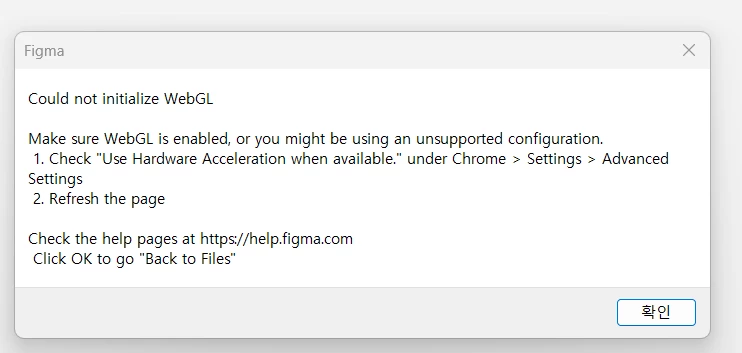
i dont understand what this error pop-up is requesting me to do. I deleted the chrome app. 

please help. 

Now if i open figma app, only a white screen will open. i cant see anything. 


1 reply

Gayani_S
Figmate
  • Community Support
  • January 7, 2026

Hey ​@Yyoung P, thanks for flagging this! 

We understand these problems are blocking you from working in Figma and want to help troubleshoot further. 
 
This error message is displayed when Figma detects that WebGL (an API that is required to render graphics in the browser) is not running as expected on your device. Many users report that they encounter this issue when their device's graphic card drivers are not up to date or when their device has other system-specific problems which prevent their device from being able to render more graphics card intensive content after longer periods of use.
 
To troubleshoot further here, can you please confirm the following:

  1. Is hardware acceleration enabled in your web browser? For example, in Google Chrome, this setting can be found under Settings > System.
  2. If you go to https://webglreport.com/ in a supported browser does it show you have webGL enabled? Are you able to run a webGL heavy site like https://webglsamples.org/aquarium/aquarium.html?


Thank you for your help to check this information!