

noodle312
June 13, 2024
Question

Figma App: Header Area not reacting properly on iPhone

  • June 13, 2024
  • 14 replies
  • 823 views

Hi there!

I’ve encountered an issue when running my mobile prototypes on an iPhone with the Figma App.

Actions placed in the header area (around 44px from the top) will not react on click/tap events. I have run some tests (see the screenshot)

The green squares react on the on click event and open the overlay. The red ones don’t.
The third square reacts from the bottom half of it.
Also tested it with bigger squares to make sure that the clickable area isn’t to small, but had the same result.
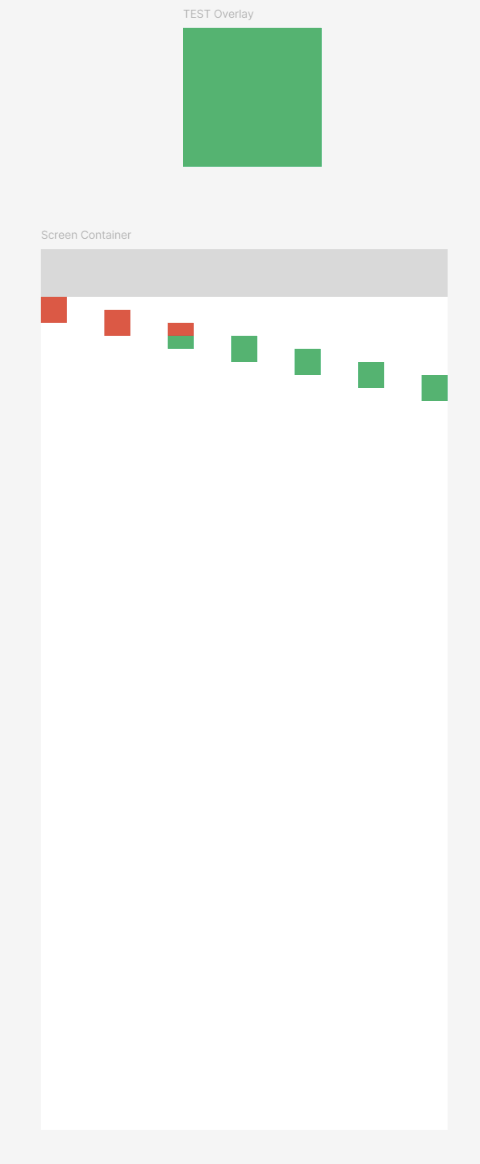
The issue occured on: iPhone 13 Mini, iPhone 13 Pro Max, iPhone 15 Plus.
However it worked on an iPhone SE (with the black bars on top and bottom).
It also works as expected on a Samsung Galaxy A40.

Thank you in advance!
Michael

This topic has been closed for replies.

14 replies

Nils_Mewes
June 19, 2024

Seems to be fixed with the latest update for ‎Figma on the App Store

Dejan_Djuric
June 19, 2024

This bug is fixed on the latest update of Figma app 🙌

noodle312
noodle312Author
June 19, 2024

Works partially for me…

it works as expected as long as the iOS status bar is hidden.
After a two-finger long press the status bar appears and the header area is still not responding… 😕

Version: 24.13.0
Phone: iPhone 13 Pro Max

tomhoodjs
New Participant
December 20, 2024

Hey there,
It can be a bit annoying when your app icons seem tiny on your iPhone screen. There are a few things you can try to adjust the icon size.
Zoom:- Your iPhone likely has a zoom setting that can make everything on the screen, including app icons, appear larger.
Display & Brightness:- In your phone’s settings, you might find options to adjust the display size and text. Increasing the text size can sometimes make the app icons appear larger as well.
Accessibility:- Your phone’s accessibility settings might have options to adjust the display size and font for better readability. These settings can also sometimes affect the size of app icons.

If you are facing the issue after trying these solution, you can follow for more details instruction below.
https://thegeekpage.com/app-icons-are-too-small-on-iphone-how-to-fix/