snowyvector
New Member
September 5, 2026
Solved

Figma AI keeps saying "Something went wrong" errors

  • September 5, 2026
  • 4 replies
  • 83 views

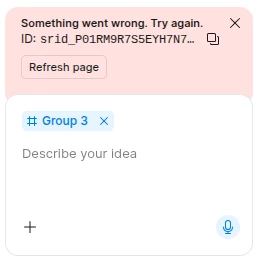
Howdy, I keep getting persistent Figma AI errors no matter what I do. Can y’all help me out?

A screenshot of an error with Figma AI


Best answer by Tom Reem

Hi ​@snowyvector — welcome to Figma Forum, and thanks for providing this screenshot.

Sorry to hear about the trouble you've encountered here.

That “Something went wrong. Try again.” error message can mean the operation failed for an unknown reason. Due to the generative nature of Figma Make and AI models, a prompt will occasionally fail this way. Typically, waiting a short while and then trying your prompt again will get you moving. Another thing to try is duplicating the file and prompting again in the copy. More details here: Troubleshoot in Figma Make → Error messages.

I saw your report, too, ​@B-V — if it's still happening or you're still blocked, let me know and I'll loop in our Customer Support team to investigate directly.

4 replies

B-V
New Member
September 6, 2026

Same issue on Pro Full Seat plan. The fact that you’re thread is still unresolved from 1 day prior to mine… somewhat alarming, I’m considering unsubscribing. What a shambles.

Tom Reem
Figmate
Tom ReemAnswer
Figmate
September 6, 2026

Hi ​@snowyvector — welcome to Figma Forum, and thanks for providing this screenshot.

Sorry to hear about the trouble you've encountered here.

That “Something went wrong. Try again.” error message can mean the operation failed for an unknown reason. Due to the generative nature of Figma Make and AI models, a prompt will occasionally fail this way. Typically, waiting a short while and then trying your prompt again will get you moving. Another thing to try is duplicating the file and prompting again in the copy. More details here: Troubleshoot in Figma Make → Error messages.

I saw your report, too, ​@B-V — if it's still happening or you're still blocked, let me know and I'll loop in our Customer Support team to investigate directly.

snowyvector
New Member
September 7, 2026

Seems to have resolved a day or two after the consistent errors, thanks ​@Tom Reem!

Tom Reem
Figmate
Figmate
September 8, 2026

Thanks for getting back to me, ​@snowyvector — glad to hear things are working as expected again. 🙌🏻

Please don’t hesitate to reach out if any other questions come up.
