
Solved

Figjam arrows won't link to next element if it's too close

  • March 5, 2025
  • 2 replies
  • 98 views

Cecilia_Marnero

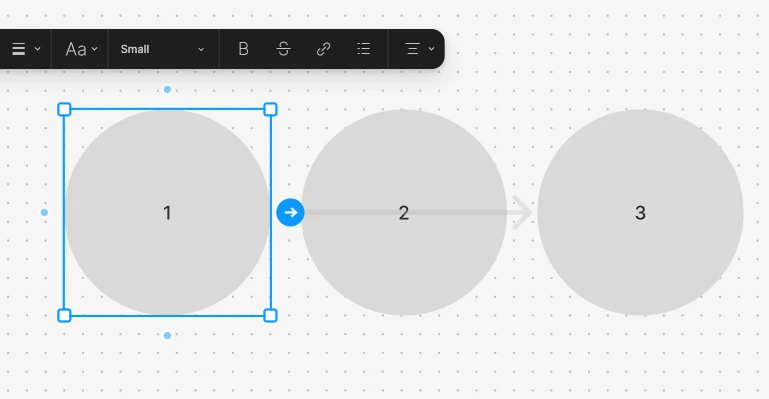
When trying to use an arrow from an element to its closest, arrow would ignore it and connect to the next one instead. 


Best answer by Tom Reem

Hey ​@Cecilia_Marnero → we've released some connector improvements today that may help here!

We cleaned up arrowheads and widened the routing margins, which may improve the behavior you described with arrows not linking to nearby elements. Full rundown of what launched today: Quality of life updates in FigJam.

Appreciate the screenshot you shared earlier — it helped illustrate the issue clearly. Give it a try and let us know how it goes. 🙏🏻

This topic has been closed for replies.

2 replies

  • Figmate
  • March 6, 2025

Hi ​@Cecilia_Marnero, Thanks for reporting this!


I was able to reproduce this behavior on our end. When you hover over the blue dot at the edge of a selected shape and use quick create to add a connector, the connector skips to the nearest shape if it’s too close.


I understand how much more useful it would be if quick create could create connectors to nearby objects. I’ll pass your feedback along to our product team for consideration. While we can’t guarantee when or if this behavior will change, we truly appreciate your help in bringing more attention to the issue.


In the meantime, I know it’s might not an ideal solution, but please use the Connectors from the shapes menu in the toolbar.


Thanks again for reaching out!


Tom Reem
Figmate
  • Figmate
  • Answer
  • April 29, 2026

Hey ​@Cecilia_Marnero → we've released some connector improvements today that may help here!

We cleaned up arrowheads and widened the routing margins, which may improve the behavior you described with arrows not linking to nearby elements. Full rundown of what launched today: Quality of life updates in FigJam.

Appreciate the screenshot you shared earlier — it helped illustrate the issue clearly. Give it a try and let us know how it goes. 🙏🏻

