

Question

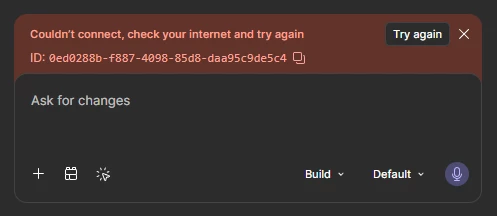
Facing Couldn't connect, check your internet and try again (ID: 0ed0288b-f887-4098-85d8-daa95c9de5c4)

  • July 2, 2026
  • 3 replies
  • 40 views

akash.v

Hi, I keep getting this error whenever I try to make any changes to a figma make file. (id: 0ed0288b-f887-4098-85d8-daa95c9de5c4)

I tried:

  • Checking the network settings - all fine
  • Cloning the make file
  • Switching accounts and trying from there
  • Testing on the application and browser
  • Restarting the application and browser

The prompt goes through, and seemingly generates something and uses credits(I can see design changes, but not code changes), but fails to actually complete the request before throwing the error and deleting everything it attempted to make. Please help somehow, already lost 800 credits into the void and don’t want to keep trying.

We are in a hurry and need to sort out this problem ASAP.

Other make files work well.


3 replies

Gayani_S
Figmate
  • Community Support
  • July 2, 2026

Hey ​@akash.v, thanks for reaching out and sharing all the details! 

I can see credits are being consumed here without the changes actually sticking, and that you're looking to get this resolved quickly. That's exactly the kind of activity our support team can dig into once a report is filed, including whether credits were used without any output being generated for you.

You've already worked through a solid list of steps, since other Figma Make files are working fine for you, this does look specific to this file rather than a general connectivity issue on your end.

A couple more things worth trying in the meantime:

  1. Click Refresh preview at the top of the preview panel to rule out a display-only glitch.
  2. If you have an earlier working version, restore it from version history rather than continuing to prompt, so you're not risking further credit use while this gets looked into.

Given the credit activity involved, the fastest path forward is to submit a bug report directly from Figma Make (Feedback in the top menu, then Bug report), referencing your error ID: 0ed0288b-f887-4098-85d8-daa95c9de5c4. This automatically creates a support ticket with your debug logs attached, so the team can review your account and the credit activity on this file directly.

You can find more on common errors and next steps in Troubleshoot in Figma Make.


Hope this helps! 


akash.v
  • Author
  • New Member
  • July 2, 2026

Hey Gayani_s,

Thanks for replying. As for the workarounds you mentioned - I have tried them both - But still get the same issue. All the changes are being made but at the end without the changes getting saved, the error is coming and reverts back to how it was!

And regarding creating a Bug Report, I have created bug report & got the ticket ID via ask support chatbot (was very useful) and am looking forward to hear from the support team!


Gayani_S
Figmate
  • Community Support
  • July 3, 2026

Hey ​@akash.v, thanks for the update!

Good news, I can see the team has just followed up on your ticket #1994725. I'd recommend checking that thread for their questions or next steps.