

Solved

Exporting animation from Figma Motion greyed out after exporting once

  • June 29, 2026
  • 4 replies
  • 150 views

Sonny Holmberg

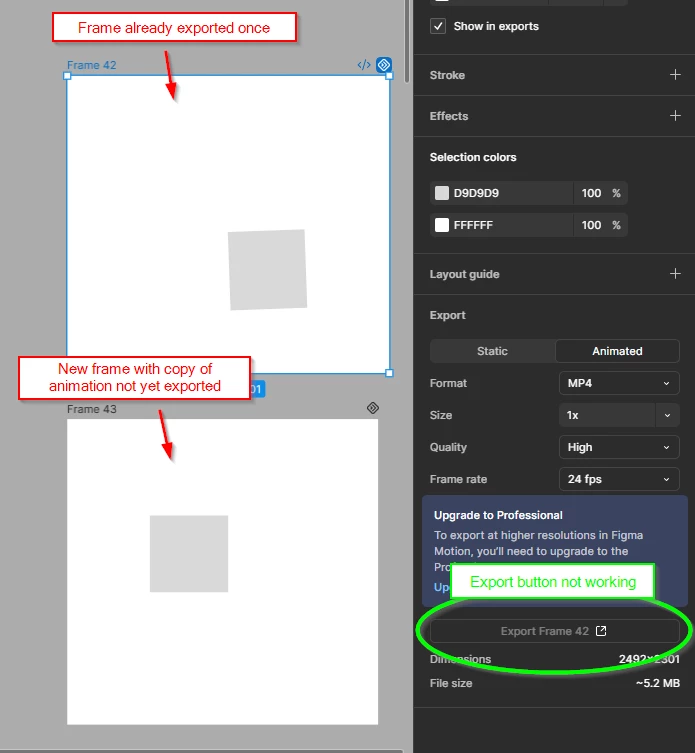
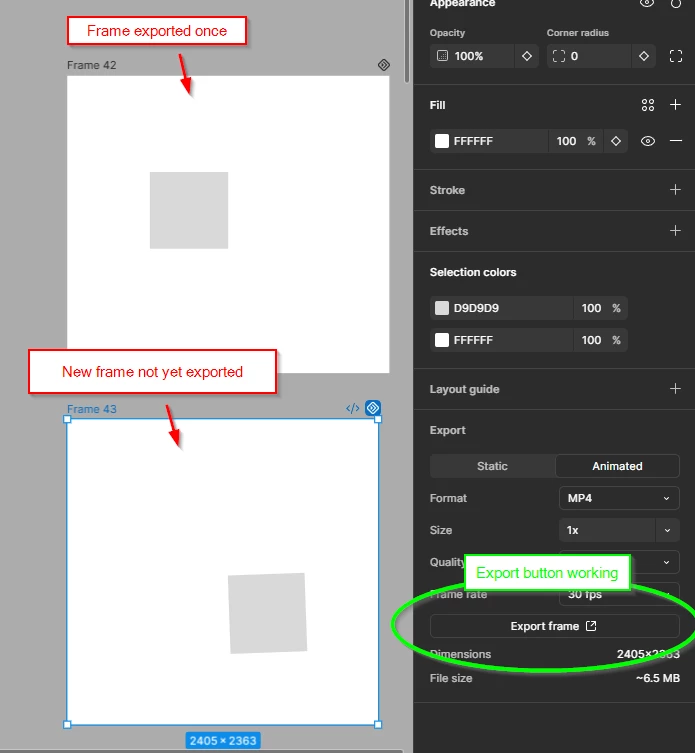
I have just given Figma Motion a quick spin, but whenever I want to export a frame containing animations made with Figma Motion, it greys out the button for exporting, which means that I can only export my animation once. I can copy animated elements into a new frame and then I can export the frame containing animations, but that is not a sustainable workflow for creating iterations of animations and amending changes etc.

The issue is the same in the desktop app and in the browser.

Is it a bug of the Beta version of Figma Motion or am I missing something? 

Export button not working:

Export button in new frame working:


Best answer by Sonny Holmberg

Hey Jaycee,

I just tested again, and yes, you’re right - it’s because the frames containing the animation are exceeding 1920x1080 px. If I make the frames smaller than that(both height and width) after exporting, then I can export again. So it let’s me export a frame at any resolution once, and then after that, it activated the 1920x1080 limition of the frames size for the starter plan.

I think the “mystery” have been solved then. It just wasn’t fully clear to me that the frame sizes were the issue, as it was letting me export first time at any size.

Thanks for your help with the claryfication!

4 replies

Jaycee Lewis
Figmate

Hey hey! I so glad to hear you are trying out Figma Motion! I appreciate you taking the time to include the detailed write-up and the screenshots. It’s really helpful.

Would you be able to share a short screen recording of the full sequence on the affected frame?

Ideally:

  • The first export, then opening/downloading it
  • Then coming back to the canvas and trying to export that same frame a second time
  • Seeing what changes between the first and second attempt will tell us a lot more than the static panel states can

A couple of quick things worth checking in the meantime:

  • After that first export, does the Animated tab itself grey out, or is it just the Export button?
  • And is the original frame still showing the Motion icon once you've exported it once?

Thanks for the additional details! — Jaycee


Sonny Holmberg

Thanks for you reply, Jaycee!

Here’s a screen recording of what happens after exporting to mp4 once and then the frame changes to greying out the export button. Then I create a new frame and copy the animated element into it and I can then export that new frame.

Is it a limit of the free plan? I can’t see anywhere any mention of limits in exporting animations only once in the free plan. Only mentioned limits I can find are fps and resolution of the export.


Jaycee Lewis
Figmate

Hey ​@Sonny Holmberg 👋 Looking at the docs, I see this part “Exporting animations larger than 1920 x 1080 or exceeding 30 FPS” which looks like it should be the blocker with a Starter plan. But in your video, it looks like all are greater than that.Can you verify the animations are > 1920 x 1080 and not just their Frames, please? 

It seems inconsistent at best. Let me get us a support ticket open and I’ll post the ID and subject line for the support email back here. Talk soon! — Jaycee


Sonny Holmberg
  • Author
  • New Member
  • Answer
  • July 2, 2026

Hey Jaycee,

I just tested again, and yes, you’re right - it’s because the frames containing the animation are exceeding 1920x1080 px. If I make the frames smaller than that(both height and width) after exporting, then I can export again. So it let’s me export a frame at any resolution once, and then after that, it activated the 1920x1080 limition of the frames size for the starter plan.

I think the “mystery” have been solved then. It just wasn’t fully clear to me that the frame sizes were the issue, as it was letting me export first time at any size.

Thanks for your help with the claryfication!