

"Export to Figma Make" button missing on Education Plan despite meeting all requirements
I am reporting an issue where the "Export to Figma Make" option is not appearing in the Publish modal of my design libraries. I have followed the official documentation and verified that I meet all the technical requirements, but the button remains missing.
What I have verified/tried:
-
Plan Status: I am on a verified Education Plan (Higher Education).
-
AI Access: I have AI credits available
-
File Location: The library files are located within my Education Team projects, not in Drafts or a Starter Team.
-
Permissions: I have full Edit access to all design files I am attempting to turn into libraries.
-
Content: The libraries contain published components, styles, and variables.
-
Testing with Demo Files: I have tried publishing several different libraries, including the official "Figma Design System" demo library from the Figma Community, and the button still does not appear.
-
Library Visibility: The libraries are published successfully and I can see/import them into other standard design files within the same team without issue.
-
App Version: I have checked for updates on the Figma Desktop App and have also tested this in the browser (firefox) with the same result.
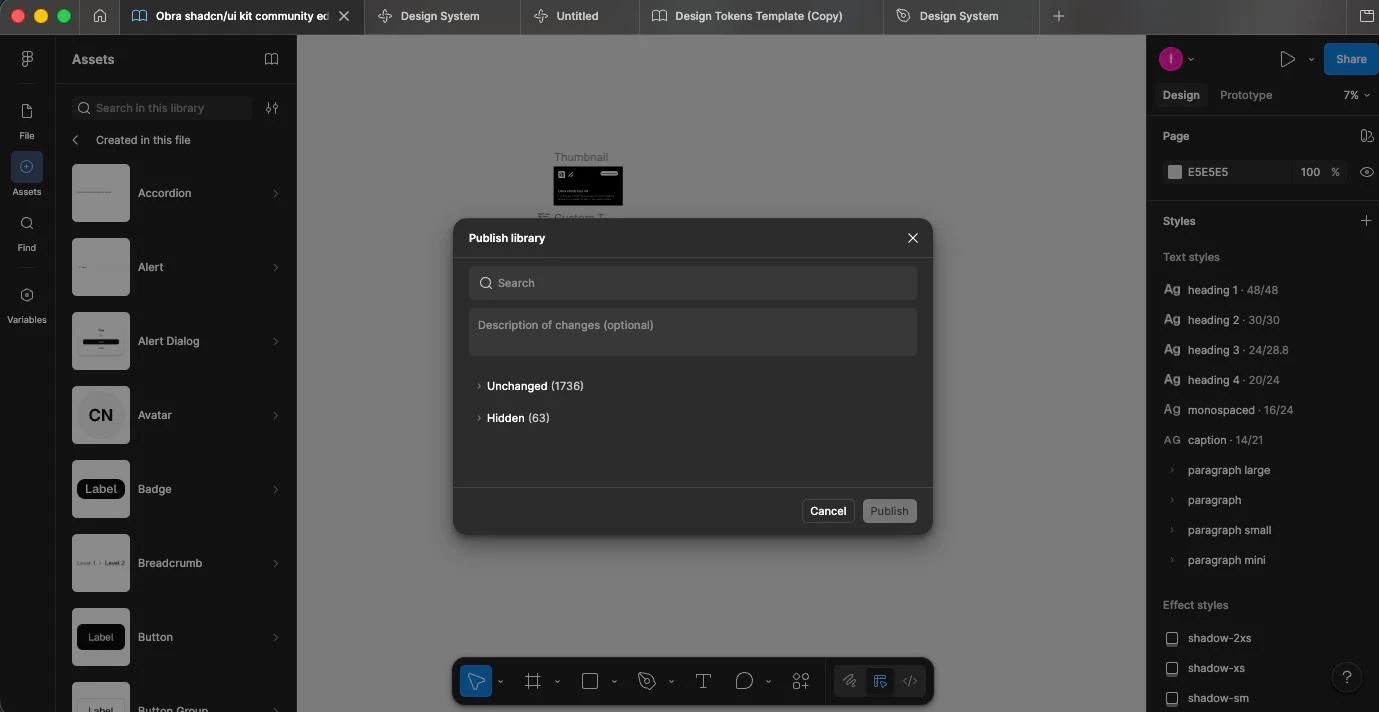
The Issue: When I open the Assets tab, click the Libraries icon, and open the Publish modal, there is no "Export for Make" button available in the interface. This prevents me from bringing style context into Figma Make.
Are there specific regional restrictions or a known bug affecting Education accounts regarding this feature rollout? Any help would be appreciated.